 A Udexreal guide
How Long Do VR Haptic Gloves Last? Durability and Care Tips
Haptic gloves typically last 1 to 3 years with proper care, though lifespan depends on build quality, usage intensity, and maintenance habits.
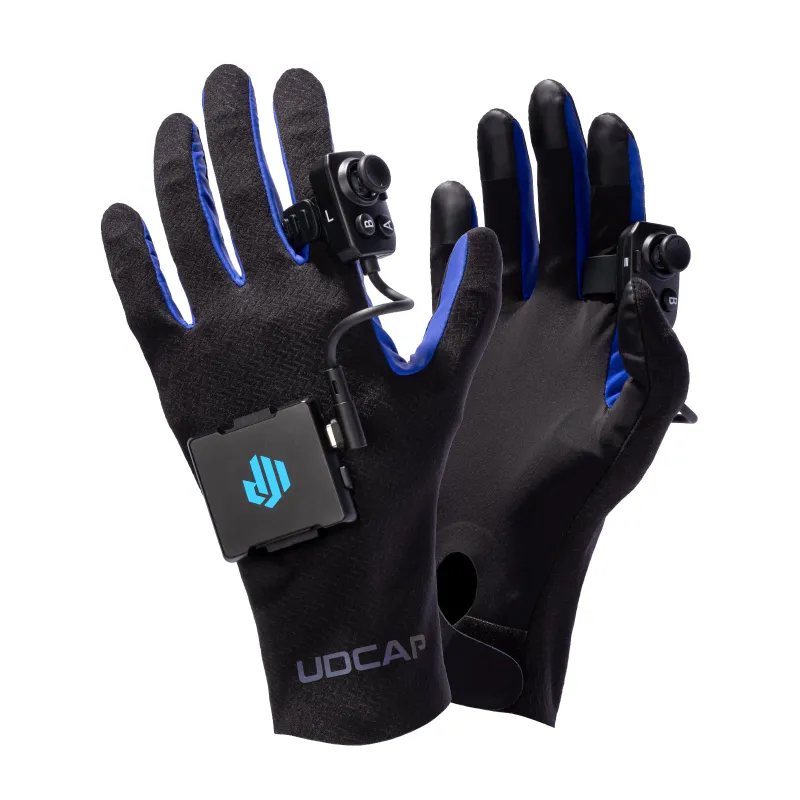
Most haptic gloves last between 1 and 3 years under typical use, though premium models like the Udexreal dexcap can exceed that range with proper maintenance. Lifespan depends heavily on build quality, how often you use them, and whether you follow basic care practices.
What Determines Haptic Glove Durability
The build quality of haptic vr gloves varies significantly across brands. Consumer-grade models typically use fabric blends with embedded sensors, while professional options feature reinforced stitching and modular components that can be replaced individually. Three primary factors influence longevity:
- Sensor type and placement: Conductive fiber sensors generally outlast rigid motor-based haptics because they flex without mechanical failure
- Fabric durability: Stretch-resistant materials like those in stretchsense vr gaming gloves withstand repeated finger movements better than basic spandex blends
- Connection points: USB-C ports and cable strain relief determine whether wiring fails before the glove itself does
- Battery design: Rechargeable units in wireless models typically handle 300 to 500 charge cycles before capacity drops noticeably
For current pricing on durable options, check our Udexreal discount page.
Common Wear Points and How to Spot Them
The fingertips and palm contact zones fail first because they endure constant friction during VRChat sessions and fast-paced games. Watch for these warning signs:
- Fraying seams along the fingers or wrist cuff, especially where sensors attach
- Inconsistent tracking when specific fingers stop registering or ghost inputs appear
- Reduced haptic response as motors weaken or conductive threads lose contact
- Cable wiggle near the glove’s connector port
If you notice tracking issues early, recalibration usually resolves them before permanent damage occurs.
Care Practices That Extend Lifespan
We recommend a maintenance routine that takes under five minutes per session. Small habits prevent the majority of premature failures:
After each use:
- Wipe down haptic glove surfaces with a dry microfiber cloth to remove sweat and oils
- Loosen straps fully so elastic retains its tension
- Store flat or loosely rolled, never folded sharply at sensor zones
- Disconnect cables gently by gripping the connector, not yanking the wire
Weekly deep care:
- Spot-clean fabric with isopropyl alcohol on a cloth (never soak the glove)
- Inspect USB ports and charging contacts for lint or corrosion
- Test all finger tracking zones in your headset’s settings menu
Monthly checks:
- Update firmware if the manufacturer releases patches that improve sensor longevity
- Verify strap Velcro isn’t packed with debris that weakens grip
- Compare tracking accuracy against your first-use baseline
When you grab our code, consider ordering a second pair for rotation. Alternating between two sets of vrchat gloves cuts wear-per-glove in half and gives each pair recovery time between intensive sessions.
Battery and Electronics Longevity
Wireless haptic gloves rely on lithium-polymer batteries that degrade with charge cycles. To maximize battery life:
- Charge when the battery reaches 20 to 30% rather than letting it fully drain
- Avoid leaving gloves plugged in for days after reaching 100%
- Store at 50% charge if you won’t use them for weeks
- Keep them away from heat sources, which accelerate lithium-ion aging
Wired models like some vr hand trackers skip battery concerns entirely but introduce cable fatigue.
Sizing and Fit Impact on Durability
An improper fit accelerates wear because the fabric stretches beyond its designed limits or sensors shift out of alignment.
| Size Issue | Effect on Lifespan | Fix |
|---|---|---|
| Too tight | Seam stress, restricted circulation | Size up or adjust straps looser |
| Too loose | Sensor misalignment, excess fabric friction | Size down or use retention bands |
| Correct fit | Even wear distribution, stable tracking | Follow manufacturer sizing charts |
Most brands offer sizing guides based on palm width and finger length. Measure twice before ordering, and if you’re between sizes, we recommend sizing up for comfort since you can tighten straps but can’t add fabric.
When to Repair vs Replace
Minor issues like loose Velcro or a single unresponsive fingertip often cost less to fix than replacing the entire unit. DIY fixes work for:
- Reattaching loose strap stitching with fabric glue or a needle
- Cleaning corroded contacts with electronics cleaner
- Replacing generic USB-C cables (not proprietary connectors)
Send the unit back to the manufacturer if tracking drift persists after recalibration or if multiple sensors fail simultaneously. These typically indicate internal wiring faults that require specialized tools. Replacement makes more sense when repair costs exceed 60% of a new pair’s price or when you’re beyond warranty and newer models offer meaningful upgrades.
For the best value on durable pairs and current bundle deals, visit our Udexreal discount page before placing your order.
Warranty Coverage and What It Includes
Most consumer haptic vr gloves include 6- to 12-month limited warranties covering manufacturing defects but not wear from normal use. Premium models sometimes extend to 24 months. Read the fine print because warranties often exclude:
- Physical damage from drops or liquids
- Wear to fabric, straps, or cosmetic elements
- Battery capacity degradation beyond a threshold (usually 50%)
- Issues caused by unofficial firmware or third-party accessories
Register your product immediately after purchase to activate coverage. Document any defects within the first 30 days while you’re still in the return window, since that gives you more leverage.
Track your purchase date and keep the receipt accessible. Some brands require proof of purchase before honoring warranty claims, and our affiliate links provide automatic order records through the retailer for your protection.
Questions
How long do haptic gloves typically last with daily use?
With daily use, most haptic gloves last 12 to 24 months before showing noticeable wear. Premium models with reinforced construction and modular components can exceed 3 years if you follow proper care routines.
Can I wash VR haptic gloves?
Never submerge haptic gloves in water or machine wash them. Instead, spot-clean with a lightly dampened cloth and isopropyl alcohol, focusing on sweat-prone areas while avoiding sensor zones and electronics.
What fails first on VR gloves?
Fingertip sensors and palm contact zones typically fail first due to constant friction. Cable connectors and battery capacity are the next most common failure points, usually appearing after 12 to 18 months of regular use.
Do Udexreal dexcap gloves have replaceable parts?
Many Udexreal models feature modular designs with replaceable cables and sensor modules. Check with the manufacturer about part availability for your specific model, as component-level repairs often extend lifespan significantly.
How should I store haptic VR gloves when not in use?
Store haptic gloves flat or loosely rolled in a cool, dry place away from direct sunlight. Loosen all straps fully, disconnect cables gently, and maintain battery charge around 50% for long-term storage.
Does glove size affect how long they last?
Yes, incorrectly sized gloves wear out faster. Too-tight gloves stress seams and stretch fabric beyond design limits, while oversized gloves cause sensor misalignment and excess friction that degrades materials prematurely.
Products in this guide
 Shopping at Udexreal? See the discount code
10% OFF All Orders
Shopping at Udexreal? See the discount code
10% OFF All Orders
More in this series
StretchSense vs Udexreal Dexcap: Which VR Hand Tracking System to Buy20 Aug 20264 minDo Haptic VR Gloves Work with SteamVR and VRChat? Compatibility Guide20 Aug 20264 minVR Gloves vs Controllers: Which Is Better for Full-Body VR Gaming?20 Aug 20265 minHow to Set Up Finger Tracking Gloves with Meta Quest 320 Aug 20265 minDo Udexreal Haptic Gloves Improve VRChat Immersion?20 Aug 20265 min