 A Udexreal guide
What Do UDCAP Gloves Add to VRChat? Finger Tracking and Haptics
UDCAP gloves bring 15 joint finger tracking, vibration and thumb controls to VRChat through SteamVR. Here is what they add and what you still need.
In VRChat, Udexreal’s UDCAP gloves add individual finger tracking, vibration feedback and thumb controls that move with your hand: Udexreal says each glove reads all 15 finger joints through 12 elastic sensors and supports VRChat’s Skeletal Input 2.0, so your avatar’s fingers follow yours without OSC parameters or Unity work. What they do not add is hand position tracking, which still comes from a tracker on each glove. You can find the current code on our Udexreal discount code page.
What changes for your avatar’s hands
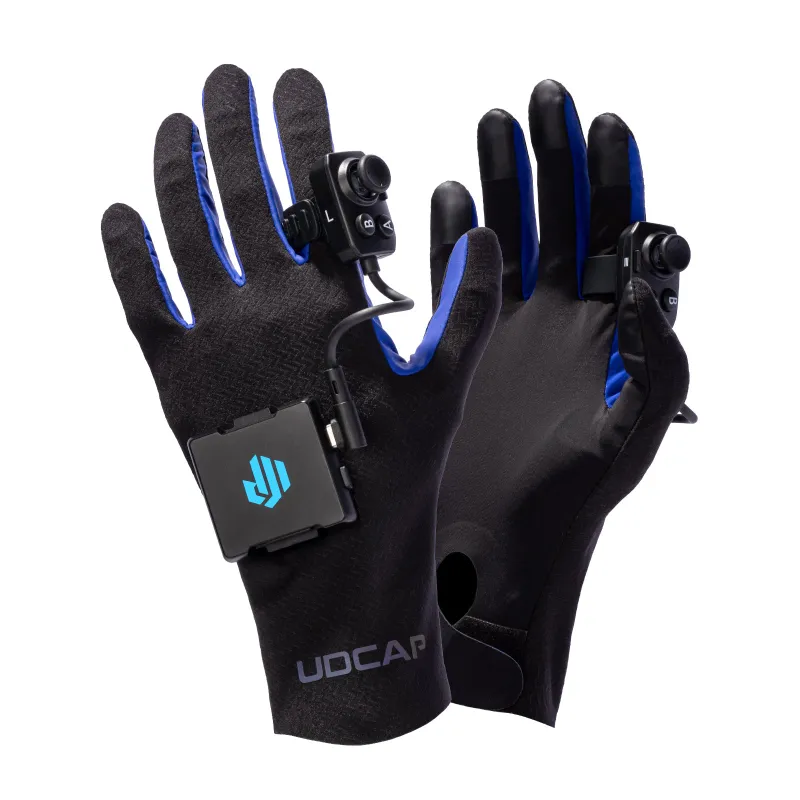
The UDCAP VR Gloves track your fingers with sensors built into the glove itself. Here is how Udexreal describes the tracking:
- 12 sensors per glove covering all 15 finger joints, for a total of 21 joint angles.
- Elastic polymer sensors that Udexreal says replace traditional IMU sensors and copper wires, and capture stretch and bend at a resolution of 0.01 degrees.
- Skeletal Input 2.0 support in VRChat, which Udexreal says lets you control your avatar’s hands without OSC parameters or any extra work in Unity.
- SteamVR Skeletal Input as well as standard SteamVR input, with the gloves appearing to games as Index controllers through Udexreal’s SteamVR driver.
For VRChat, that means gestures, pointing, waving and hand signs come from your real fingers rather than from button combinations.
Haptics and in-game controls
The haptics come from the control module, which attaches at the index finger. Udexreal lists high-intensity vibration that gives real-time feedback for actions such as pointing and shooting and for environmental cues in games. This is vibration, not force feedback: you feel a buzz, but nothing resists your fingers when you grip a virtual object.
The same module carries a Hall-effect joystick and A/B buttons under your thumb. In VRChat that covers movement and menus, so you are not giving up controller functions to get finger tracking. The current glove set ships with the Control Module 2.0 version, according to the product page.
What you need to run them in VRChat
This is where buyers need to read carefully. Udexreal states:
- The gloves must be connected to a PC and used through SteamVR. They cannot be used on their own or with an all-in-one headset running standalone.
- The gloves do not track where your hands are in space. Each glove needs an external tracker: a Vive Tracker, Tundra Tracker, Ultimate Tracker, or a Quest controller used as a tracker.
- You choose a tracker adaptor (Basic, Tundra, UTK or Controller) when you order, to mount that tracker on the glove.
Setup follows three steps on Udexreal’s page: open the gloves and connect them to the UDCAP Driver software, calibrate by performing three hand gestures, then mount the tracker and configure SteamVR. The gloves talk to the PC over a 2.4G USB dongle, which Udexreal rates at 120Hz, under 10ms latency and up to 10 meters of range.
Comfort and battery for long VRChat sessions
Social VR means long sessions, so comfort counts. Udexreal says the gloves use the same Lycra fabric as shaping garments, which it describes as lightweight, moisture-wicking and breathable. It also says they are light enough to hold a drink, type or scroll your phone without taking them off. Liner gloves and strap bands are included in the box.
On battery, Udexreal lists up to 15 hours of battery life without haptic feedback. That figure is for haptics off, so expect less with vibration in use.
Fit matters for tracking as well as comfort. The gloves come in S to XXL. Udexreal’s size chart tells you to start with palm circumference, then check middle finger length, and to go by finger length when the two disagree.
Before you order
Three points from Udexreal’s product page are worth knowing first. Orders ship within 14 days, with delivery estimated at 13 to 15 business days after carrier pickup. Returns and exchanges are not supported once an order has shipped, so confirm your size, tracker and PC setup before you buy. The warranty period is 1 year, and Udexreal sells an extended warranty of 1 or 2 more years, plus spare control modules, dongles, cables and replacement gloves if a part fails later.
Questions
Do UDCAP gloves work in VRChat?
Yes. Udexreal says the gloves support VRChat's Skeletal Input 2.0, so your avatar's hands follow your fingers without OSC parameters or extra Unity work. They run through SteamVR on a PC.
Can I use UDCAP gloves with a Quest 3 without a PC?
No. Udexreal states the gloves cannot be used independently or with an all-in-one headset. They must connect to a PC and run through SteamVR. A Quest controller can serve as the tracker on each glove.
Do the gloves give force feedback?
No. The control module provides vibration feedback. Nothing physically resists your fingers when you grip a virtual object.
How long does the UDCAP battery last?
Udexreal lists up to 15 hours of battery life without haptic feedback. With vibration in use, plan for less.
Can I return UDCAP gloves?
Udexreal's product page says returns and exchanges are not supported after the order ships, and to contact [email protected] about special circumstances. The warranty period is 1 year.
Products in this guide
Shopping at Udexreal? See the discount code
10% OFF All Orders
More in this series
Udexreal Control Module 2 vs the Original: What Changes?20 Aug 20263 minHow Long Do VR Haptic Gloves Last? Durability and Care Tips20 Aug 20263 minDo Haptic VR Gloves Work with SteamVR and VRChat? Compatibility Guide20 Aug 20264 minVR Gloves vs Controllers: Which Is Better for Full-Body VR Gaming?20 Aug 20263 minWhich Udexreal Tracker Adaptor Do You Need for UDCAP Gloves?20 Aug 20263 min