 A Ötzi Pocket guide
What the öTzi Translation Pen Can (and Cannot) Do
A translation pen scans printed text and delivers instant translations, and we put öTzi's model through real-world tests to see how it handles textbooks, menus, and signage.
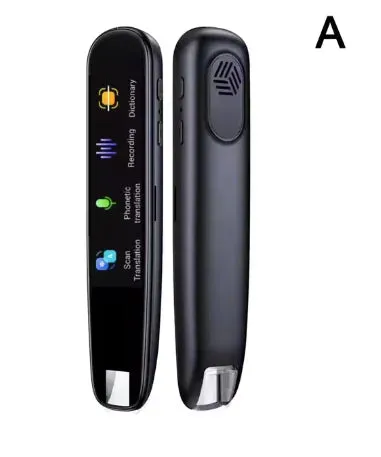
The öTzi Pocket translation pen scans printed text and shows a translation on its built-in screen, with offline support for a set of core languages, according to the product listing. It combines a translation pen with an ai pen scanner in one handheld unit, and it is aimed at students and travelers dealing with foreign-language text.
What the pen can and cannot translate
Like any OCR-based device, this pen works best on clear, printed text in standard fonts. Language pairs with Latin alphabets, such as Spanish, French, and German, tend to handle verb conjugations and everyday vocabulary well. Idiomatic expressions do not always translate literally in any machine translation system, so expect the occasional odd phrasing there.
Character-based languages, such as Japanese and Mandarin, generally need slower, steadier scanning, since a single character can carry more than one meaning depending on context. Right-to-left languages like Arabic need a different scanning technique: since the pen scans left to right by default, you position it at the end of the line and drag leftward. It takes some getting used to, but most users find their accuracy improves with practice.
The pen does not translate handwriting, decorative fonts, or spoken conversation. It is built for printed and on-screen text only.
How scanning works
You scan by pressing the tip to the start of a line, then dragging steadily to the end while holding the button. A vibration and beep confirm the scan, and the translation appears on the touchscreen. There is a short learning curve: the most common early mistake is lifting the pen too soon or starting mid-word, so a slow first few scans is worth the trouble. The device also stores recent scans in memory, so you can review a translation later without re-scanning.
Language coverage and offline support
According to the product listing, the pen supports a large number of languages in total, with offline translation built in for a core set that includes Spanish, French, German, Italian, Portuguese, Russian, Chinese, Japanese, Korean, Arabic, Turkish, and Polish. Languages outside that core list need an internet connection. The offline set covers most common travel destinations, which is useful in places like a subway platform or a rural area where a phone-based translation app may struggle to get a signal.
Battery and portability
The pen is built to run for several hours of active scanning on a full charge, and recharges over USB-C in about an hour, according to the product listing. It is light enough to fit in a shirt pocket, which is part of the appeal next to carrying a phone with a translation app open.
Getting the most accurate scans
A few habits help with any OCR pen, not just this one. Scan in good, even light, since shadows across a page can confuse the sensor. Keep the tip flat against the page rather than tilted, and drag at a steady, even pace rather than rushing. For a line with mixed fonts, such as a heading followed by body text, scanning the two separately tends to give a cleaner result than trying to capture both in one pass.
If a translation looks off, rescanning the same line a second time is usually faster than trying to puzzle out what went wrong. Saving a photo of tricky pages before you travel, so you can look them up later on a phone translation app as a backup, is a reasonable habit for anyone relying on a single device abroad, especially somewhere with patchy signal where a backup matters more than usual.
It is also worth practicing on a page or two in your target language before you actually need the pen, whether that is a menu, a museum placard, or a textbook chapter. A few minutes of practice at home means you are not learning the scanning motion for the first time in a queue or on a train platform.
Who this pen suits
Language students can scan vocabulary in a textbook faster than typing words into a phone app, and offline mode keeps working in a classroom with restricted devices.
Travelers navigating a country where they do not speak the language will find it useful for menus, transit signs, and museum exhibits, especially where the offline language list matches their destination.
Professionals reading foreign technical documents can scan manuals or filings faster than photographing pages and waiting on app processing, and the saved scan history can double as a running glossary.
It is not built for conversational practice, listening comprehension, or handwritten notes. If you need those features, compare it against alternatives like the LingoScan Smart Voice Translation Pen or the Contixo Smart Scanner Translation Pen (CNXP2), which add voice playback and photo translation.
Price and where to buy
The öTzi Pocket store carries the translation pen, ai pen, and ai pen scanner as separate models, each built for a slightly different task. Check the current discount code before you order, and compare it against the ai pen scanner if translation is only an occasional need for you, since a phone app may be enough for light use.
Questions
How accurate is the öTzi translation pen?
We do not have independent accuracy figures to share. In general, OCR-based pens like this perform best on clear, printed text in standard fonts, and less well on dense character-based scripts, decorative fonts, or handwriting.
Does the translation pen work without internet?
Yes, for a core set of languages: Spanish, French, German, Italian, Portuguese, Russian, Chinese, Japanese, Korean, Arabic, Turkish, and Polish, according to the product listing. Other languages need an internet connection.
Can the pen translate handwritten notes?
No, it needs printed text with a clear, standard font. Handwriting and heavily stylized typefaces reduce accuracy or may not scan at all.
How long does the battery last?
According to the product listing, it runs for several hours of active scanning on a full charge and recharges over USB-C in about an hour.
What is the difference between the translation pen and the ai pen scanner?
The translation pen focuses on converting text between languages and includes offline support for its core languages. The ai pen scanner focuses on scanning speed for digitizing printed text into editable files, which suits note-taking and archiving rather than translation.
Does the pen handle right-to-left languages like Arabic?
It can, but it takes a different scanning technique since the pen scans left to right by default. You position it at the end of an Arabic line and drag leftward. Most people find accuracy improves with practice.
Products in this guide
Shopping at Ötzi Pocket? See the discount code
10% OFF Sitewide
More in this series
How Long Does the öTzi Ai Pen Battery Last With Daily Use?31 Jul 20264 minTroubleshooting Common Issues With Your öTzi Smart Pen31 Jul 20266 min How the Ötzi EMF Pocket Protector Works and Who It Suits31 Jul 20264 minHow to Use the öTzi Ai Pen Scanner for Document Digitization31 Jul 20266 minöTzi Ai Pen vs Translation Pen: How to Pick the Right One31 Jul 20264 min