 A Ötzi Pocket guide
öTzi Ai Pen vs Translation Pen: How to Pick the Right One
A translation pen delivers instant language support, while an ai pen offers broader scanning and text extraction—here's how to pick the right one.
A translation pen is built to scan and translate text in real time, while an ai pen is built to scan, digitize, and extract text for note-taking and other uses. Both tools come from Ötzi Pocket, and the right one for you depends on whether you need language help or a general text-capture tool.
What each pen actually does
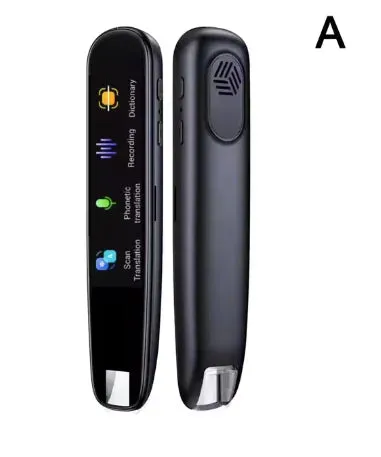
The translation pen is built for language learners, travelers, and readers who run into foreign text. It scans printed words and shows a translation on its built-in screen, and it supports offline translation for a set of core languages so you are not dependent on a phone or Wi-Fi for basic use. You glide the pen tip over a line of text, and the translation appears on the display.
The ai pen is a broader scanning tool for students, professionals, and anyone who wants to digitize printed text. It captures text from books, documents, and labels, then transfers it to your phone or computer for note-taking, editing, or sharing. Some models include translation features, but the core strength is text extraction.
If you need a dedicated language tool for travel or study, the translation pen is the more focused choice. If you scan a variety of content, such as quotes, notes, or receipts, the ai pen offers more flexibility. You can check the latest price for both models on the Ötzi Pocket store.
Key features to compare
| Feature | Translation pen | Ai pen |
|---|---|---|
| Primary use | Instant translation of foreign text | Text scanning and digitization |
| Language support | Broad language list, offline translation for core languages | Varies by model; some include translation |
| Connectivity | Standalone or Bluetooth sync | Bluetooth or USB sync required |
| Screen | Built-in display for translations | Typically no screen; syncs to a device |
Both pens use optical character recognition (OCR) to read printed text, and the ai pen scanner is built to capture large volumes of text quickly, which suits research or work settings where you need to move content into a digital format.
For context on the wider category, devices like the LingoScan Smart Voice Translation Pen and the Contixo Smart Scanner Translation Pen (CNXP2) show the range of features on the market, from voice playback to classroom-focused scanning.
Who should choose the translation pen
We would suggest the Ötzi translation pen if you:
- Travel frequently and want quick translations of signs, menus, tickets, or instructions without pulling out a phone app
- Study a foreign language and want fast definitions or translations while reading textbooks or articles
- Work with multilingual documents and need a quick way to understand content in a language you do not speak fluently
- Prefer offline functionality so you are not relying on Wi-Fi or mobile data
The built-in screen and immediate feedback make it feel like a pocket dictionary. Ötzi Pocket offers direct support and a sitewide discount when you grab the code, worth comparing against other retailers before you buy.
Who should choose the ai pen
The ai pen is the better pick if your priority is capturing and organizing text rather than translating it. Consider it if you:
- Take notes from printed sources like textbooks or reference books and want them digitized
- Scan product info, receipts, or labels for research or documentation
- Need text extraction for several uses, such as copying quotes or pulling data into a spreadsheet
- Want a multi-purpose tool that handles English and other languages without being limited to translation
The ai pen syncs with apps on your phone or computer, which gives you flexibility to edit, organize, or share scanned content, and it suits students and professionals who deal with a lot of printed material.
Accuracy and practical limits
Both pens rely on clean, printed text for the best results. Handwriting, faded ink, or heavily stylized fonts reduce accuracy on any OCR-based device, including these. Translation quality also depends on the language pair: common pairs tend to be more reliable, while less common languages or idiomatic expressions may need a second check.
The ai pen’s translation feature, where included, is a bonus rather than the main event, so do not expect the same depth as a dedicated translation pen.
Battery, portability, and daily use
Ötzi’s smart pens are built to run for several hours of active scanning on a charge, and recharge over USB-C in about an hour, according to the product listing. Both are pocket-sized and light enough to carry in a bag, pocket, or alongside a notebook.
For daily use, the translation pen is a little more convenient if you switch between languages often, since there is no need to open a phone app. The ai pen needs a paired device to view or edit scanned text, so you will want your phone or laptop nearby.
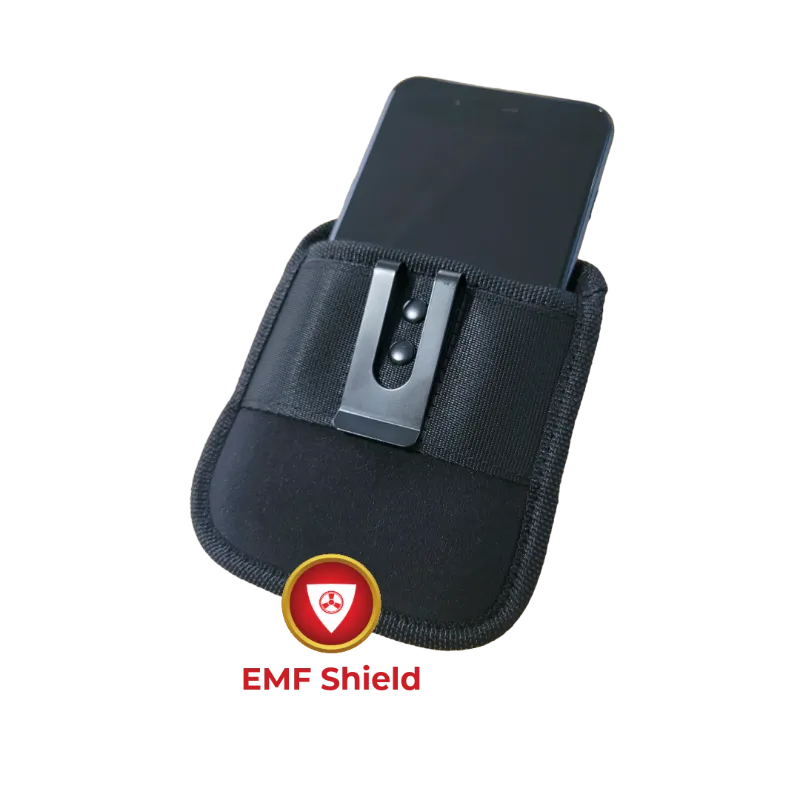
If you are also concerned about electromagnetic field exposure from Bluetooth devices, Ötzi Pocket sells an emf pocket protector designed to reduce EMF exposure from phones and other gadgets.
Our take: match the tool to your task
Choose the translation pen if instant language translation is your main goal. It is more focused and works offline, which suits travel, language learning, and multilingual reading. Choose the ai pen if you need versatile text scanning and digitizing, which suits students, researchers, and professionals capturing printed content in different contexts.
Both solve a real, narrow problem. Pick the pen that matches your most frequent use case rather than trying to find one device that does everything equally well.
Questions
What is the main difference between the ai pen and the translation pen?
The translation pen is built specifically for real-time language translation. The ai pen focuses on scanning and digitizing printed text for note-taking and text extraction, and some models add translation as a secondary feature.
Does the translation pen work without Wi-Fi?
It supports offline translation for a set of core languages, so basic use does not depend on Wi-Fi or a paired phone. Languages outside that core set may need an internet connection.
Can either pen read handwritten text?
No. Both rely on optical character recognition built for printed text in standard fonts. Handwriting, cursive, and heavily stylized fonts reduce accuracy or may not scan at all.
How long does the battery last on these smart pens?
According to the product listings, both the ai pen and the translation pen run for several hours of active scanning on a full charge and recharge over USB-C in about an hour.
Where can I find the best price on Ötzi Pocket smart pens?
Visit the Ötzi Pocket store and use the discount code on our coupon page. Prices change, so checking the store directly gets you the current offer.
Products in this guide
Shopping at Ötzi Pocket? See the discount code
10% OFF Sitewide
More in this series
How Long Does the öTzi Ai Pen Battery Last With Daily Use?31 Jul 20264 minTroubleshooting Common Issues With Your öTzi Smart Pen31 Jul 20266 minWhat the öTzi Translation Pen Can (and Cannot) Do31 Jul 20264 minHow the Ötzi EMF Pocket Protector Works and Who It Suits31 Jul 20264 minHow to Use the öTzi Ai Pen Scanner for Document Digitization31 Jul 20266 min