 A Procolored guide
Does the Procolored V11 Pro UV Printer Hold Up Under Heavy Use?
The Procolored V11 Pro UV printer under heavy use: its listed speed and ink use, built-in auto-cleaning and white ink circulation, and a routine for busy shops.
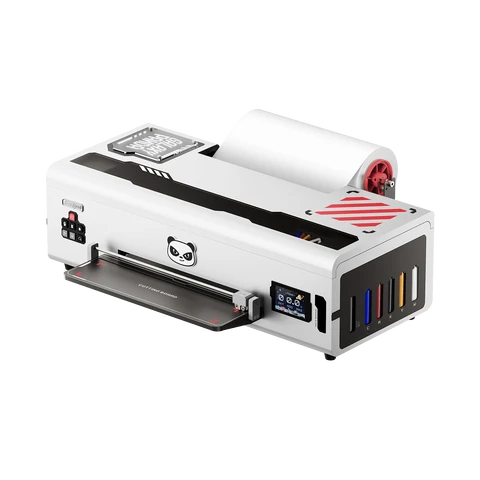
The Procolored V11 Pro UV printer is built with features aimed at regular production: dual TX800 printheads, automatic printhead cleaning every 10 hours while it is switched on, automatic white ink circulation, and a filtration system for ink dust. How well it holds up in your shop depends on keeping those systems fed and on knowing its real output: Procolored lists 8 to 9 minutes per Letter or A4 print. One naming note first: this machine is a flatbed UV printer, not a UV DTF printer, and there is no “TX300” model; TX800 is its printhead. Below we cover what the V11 Pro is, its throughput, the built-in maintenance features, and the routine that keeps it running. We keep the current code for Procolored on its store page.
What the V11 Pro is
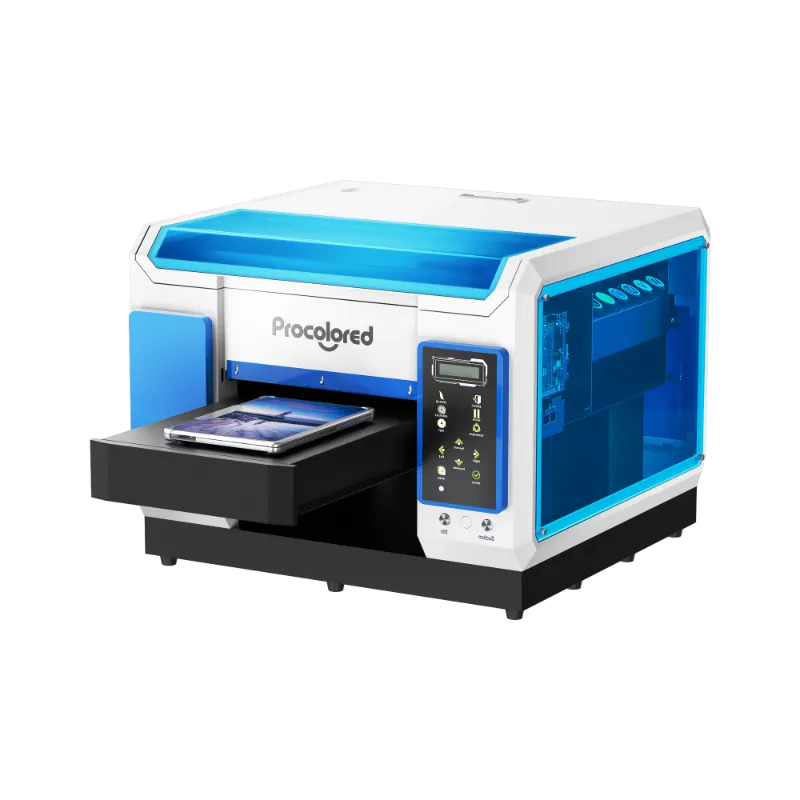
The Procolored V11 Pro UV printer prints directly onto objects and flat materials such as wood, acrylic, tile, crystal, aluminum sheet, PVC, ABS and stone, according to Procolored. It can also print onto adhesive film for stickers, with an optional laminator applying the protective film. The listing describes a varnish version where one TX800 head prints UV color and the other prints varnish for gloss, matte and texture effects.
| Spec | What Procolored lists |
|---|---|
| Printheads | Dual TX800 |
| Print size | 11.3 x 16.5 in (287 x 420mm) |
| Print height | 0 to 5.5 in (0 to 140mm) |
| Accuracy | 720 x 1440 DPI (16 pass) |
| Colors | CMYKWW plus varnish channels |
| Speed | 8 to 9 minutes per Letter or A4 |
| Ink use | 1.25ml per Letter or A4 |
| Weight and size | 70kg; 69 x 70 x 55cm |
| Software | Pro RIP, Windows only, with a USB dongle |
If you want transfer stickers for hard surfaces rather than printing straight onto objects, Procolored’s UV DTF machine is a separate model, the VF13 Pro UV DTF printer.
What “heavy use” looks like in numbers
Use Procolored’s own figures to plan your volume. At 8 to 9 minutes per Letter or A4 print, one machine running continuously produces about 6 to 7 full-size prints an hour by simple arithmetic. Smaller items ganged onto one bed run go further, since small pieces can share one print pass. At 1.25ml per A4, ink use is easy to estimate from your order count.
Those figures tell you when one V11 Pro is enough and when it is not. If your daily orders need more full-size prints than the hours you run allow, plan for that before you buy rather than after.
The maintenance features built in
- Printhead auto-cleaning. When the printer is left on, it cleans the printhead every 10 hours, using about 1ml of ink a day. Procolored says this protects the printhead and extends the printer’s life.
- Automatic white ink circulation. Procolored says this keeps white ink moving to reduce the chance of print head clogging.
- Adsorption filtration system. Absorbs ink dust and smell to protect internal parts, according to the listing.
- Adjustable UV lamp power to match print speed and material.
- Three viewing windows so you can watch the printer work and reach parts for maintenance.
Because auto-cleaning runs only while the printer is on, how you handle idle time matters. Procolored’s nozzle protection fluid page says to use the fluid to moisturize the print head when a printer is idle for 1 to 3 days, and for longer breaks to remove and clean the head and store it with a fluid-dampened lint-free cloth.
A routine for busy shops
- Use the supplied consumables first. The box includes two sets of UV ink (CMYKW, 5 x 250ml each), 2 x 250ml of varnish, metal, acrylic and glass coatings, 100ml of UV ink cleaning solution and 2 x 250ml of nozzle protection fluid.
- Pick the right ink. The V11 Pro ships with soft UV ink, which Procolored says works on rigid and soft surfaces such as leather and silicone. Hard ink adheres slightly better but can crack on soft surfaces, so buy it only if your work is all rigid items.
- Prime surfaces that need it. Use the metal, acrylic or glass coating supplied for those materials.
- Keep the software safe. The RIP runs on Windows with at least a 50GB C drive and 8GB of RAM, and needs its USB dongle; store the dongle somewhere you will not lose it.
- Order the right parts. Procolored sells V11 Pro ink sac tubes with cartridges, ink carriages and pumps as separate parts, so check the part lists for your model before you order.
Questions
Is the Procolored V11 Pro a UV DTF printer?
No. It is a flatbed UV printer that prints directly onto objects, and it can print onto adhesive film with an optional laminator. Procolored's UV DTF model is the VF13 Pro.
How fast is the Procolored V11 Pro?
Procolored lists 8 to 9 minutes per Letter or A4 print, using about 1.25ml of ink per print.
Does the V11 Pro clean its own printheads?
Yes. Procolored says it cleans the printhead automatically every 10 hours while switched on, using about 1ml of ink a day.
Should I use soft or hard UV ink in the V11 Pro?
It ships with soft ink, which Procolored says works on rigid and soft surfaces. Hard ink adheres slightly better but can crack on soft surfaces.
What is the maximum print size of the Procolored V11 Pro?
11.3 x 16.5 inches (287 x 420mm), with a print height of 0 to 140mm.
Products in this guide
 Shopping at Procolored? See the discount code
$100 OFF All Orders
More in this series
 How Does Procolored Shipping Work? Delivery Time, Fees and Tax10 Aug 20263 min
 Procolored DTF Ink: Compatibility, Storage and What to Avoid10 Aug 20263 minHow to Set Up the Procolored F8 Panda DTF Printer for Your First Print Run10 Aug 20265 min
 DTF vs DTG vs UV DTF: Which Procolored Printer Is Right for Your Business?10 Aug 20264 min