 A EIOTMART guide
EIOTMART Solar Camera Battery in Winter: Settings, Placement and Charging
How to keep an EIOTMART 4G solar camera running through winter, using the brand's own battery tips, the camera's settings and smart panel placement.
EIOTMART does not publish a battery capacity or a winter runtime for its 4G solar security camera, so there is no honest number of days to give you. What the brand does say is that the camera runs on a rechargeable battery topped up by its solar panel, that it records only when it detects motion, and that its own winter guidance is simple: shorter daylight means less stored energy, and long spells without sun can eventually drain the battery. That leaves three things in your hands for winter: settings, placement and recharging. You can find the current code on our EIOTMART discount code page.
How the solar camera uses power
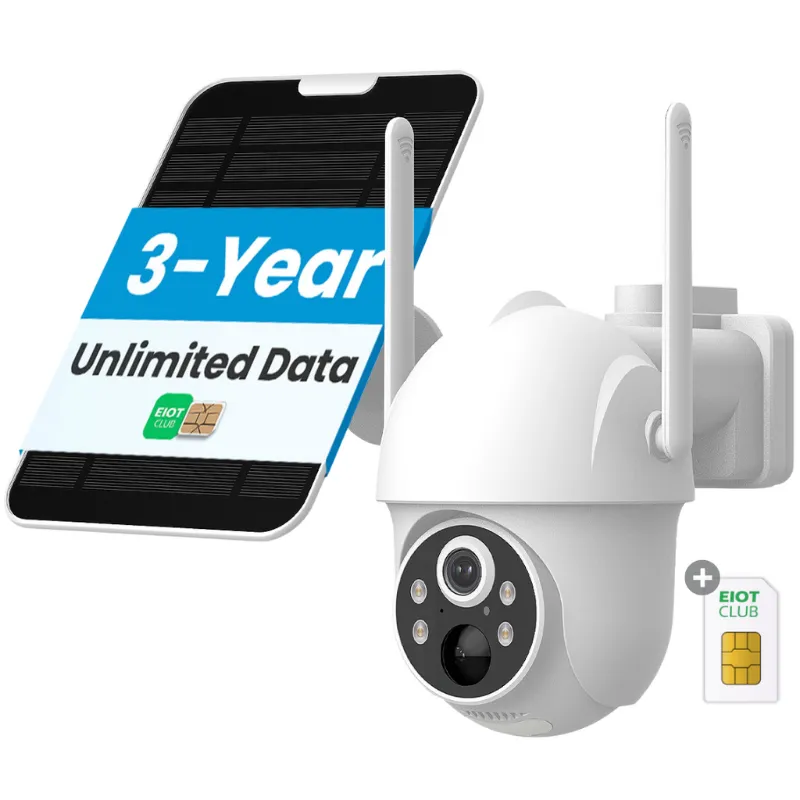
The EIOTMART 4G solar security camera with unlimited data lists these features on its product page:
- A rechargeable battery and a solar panel, described by the brand as built for continuous operation
- PIR motion detection, with recording only when motion is detected
- A clip length of 15, 30 or 60 seconds, with 15 seconds as the default
- 2K/3MP video, full-color night vision using infrared and built-in LEDs, and two-way talk
- Cloud storage and microSD cards up to 128 GB
- 4G LTE only, on AT&T, T-Mobile and Verizon in the US, with no Wi-Fi option
- An IP66 rating for dust and water resistance
Read that list as a set of levers. The camera spends energy when something triggers it, when it records, when it sends clips or alerts over 4G, and when you talk or watch through the app. In winter the panel has fewer daylight hours to put that energy back. So the aim is to keep triggers, recording time and streaming to what you need.
Settings to change before winter
EIOTMART’s own FAQ for this camera gives three ways to extend battery life:
- Reduce the PIR sensor sensitivity. A lower setting means fewer triggers from things you do not need to see.
- Turn off motion detection in high-traffic areas. A camera pointed at a busy road or a path the whole family uses will wake up all day.
- Recharge the battery promptly when it runs low. Do not wait for the camera to go dark.
Two more follow from the specs. Keep the clip length at the 15 second default unless you need longer clips; a 60 second clip records four times as long for every trigger. And use live view and two-way talk when you need them, then close the app, since both keep the camera sending video or audio over 4G.
Before you change anything, think about what you want to catch. For a gate or a cabin door, a tight view with lower sensitivity covers it. For a wide yard, you may decide the extra triggers are worth the power.
Placement and snow
A solar camera can only charge when light reaches the panel. In winter the sun sits lower and the days are shorter, so a spot that gets sun in summer can sit in shade behind a roofline, a tree trunk or a barn wall. Before you mount the camera, look at the spot at midday in the cold months if you can, and pick a place where the panel sees open sky.
After snow, check the panel. Snow or frost lying on it blocks the light that charges the battery. The camera’s IP66 rating covers dust and water, so you can brush snow off with a soft brush or a gloved hand without worrying about a wet panel. If ice has built up, let it melt instead of scraping, so you do not scratch the surface.
When the sun is not enough
EIOTMART’s solar camera guide says solar cameras store energy in their batteries to keep going at night and on cloudy days, and that long periods without sunlight can eventually drain them. If you have a run of dull days, check the camera in the UBox app, which is the only app the camera works with (there is no computer access). When the battery is low, recharge it straight away, as the FAQ advises, instead of letting it shut down in the middle of a cold spell. If the camera watches a remote site, plan when you can get to it during the darkest weeks.
The camera records to a microSD card as well as the cloud, but the card is not included in the box according to the brand’s comparison table. A card gives you a local copy of clips even when the 4G connection is weak.
Plans, shipping and refunds
The camera is sold as a bundle with an EIOTCLUB unlimited data plan of 7 days, 1 year or 3 years. The SIM in the bundle is locked to that camera. EIOTMART’s refund policy gives a 7-day window from activation to cancel a SIM service for a full refund, with partial refunds by usage after that. Orders to the US and Europe ship from local warehouses, and the shipping policy gives 2 to 5 working days for delivery there.
Questions
How long does the EIOTMART solar camera battery last in winter?
EIOTMART does not publish a battery capacity or winter runtime. Its guidance is that shorter days mean less stored energy and long sunless spells can drain the battery, so adjust settings and recharge promptly when it runs low.
How can I make the battery last longer?
EIOTMART suggests lowering PIR sensitivity, turning off motion detection in high-traffic areas and recharging promptly when the battery is low. Keeping clips at the 15 second default also cuts recording time.
Does the camera record all the time?
No. The product page says it records only when motion is detected, in clips of 15, 30 or 60 seconds.
Can the camera use Wi-Fi when the cellular signal is weak?
No. EIOTMART says this camera works only on 4G LTE. It can save clips to a microSD card of up to 128 GB, which is sold separately.
Can I use the bundled SIM in another device?
No. The product page states the included SIM is locked to this camera.
Products in this guide
Shopping at EIOTMART? See the discount code
5% OFF All Orders
More in this series
 What Is the EIOTCLUB IoT SIM Card and Do You Need It for Your EIOTMART Camera?9 Sep 20263 minEIOTMART 4G Mini vs 4G Solar Camera: Which One Do You Need?9 Sep 20263 min
 Why Does My EIOTMART SIM Card Camera Keep Disconnecting? (5 Fixes)9 Sep 20263 minHow to Set Up an EIOTMART Cellular Security Camera Without Home Wi-Fi9 Sep 20263 min