 A Signstek guide
Troubleshooting Your Signstek Smart Lock: Common Keypad Problems and Fixes
A keypad door lock from Signstek makes keyless entry simple, but common issues like unresponsive buttons, connectivity problems, or dead batteries can derail your smart home security—here's how to fix them.
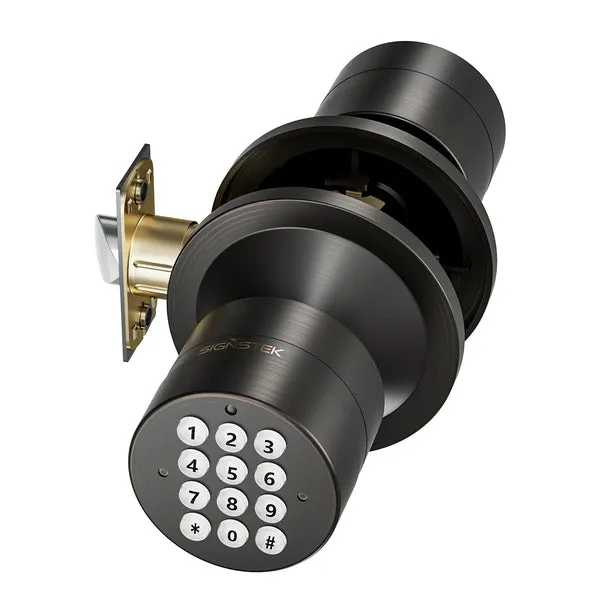
A keypad door lock offers the convenience of hands-free entry, but when yours starts acting up, you need solutions fast. Whether your keypad door lock isn’t responding, your door keypad is acting glitchy, or your door lock with keypad keeps dropping its connection, we’ve worked through these issues with Signstek locks and have the fixes that work. This guide walks you through the most common problems and how to resolve them.
Battery Issues Are the Top Culprit
A dead or dying battery is the number-one reason a keypad door lock stops working. If your lock won’t unlock, beeps weakly, or the keypad light is dim or off, check the battery first.
- Remove the battery cover on the inside of your lock
- Note the battery type (usually AA or AAA) and replace with fresh alkaline or lithium batteries
- Insert batteries with the correct polarity: positive side must face the terminal marked +
- Replace the battery cover and test the lock with your code
If your lock was sitting unused for months, corrosion or battery leakage can damage the contacts. Wipe the terminals clean with a dry cloth or isopropyl alcohol on a cotton swab before installing new batteries. Most keypad door lock models need fresh batteries every 12 to 18 months, depending on use.
Keypad Buttons Won’t Respond
Unresponsive buttons are frustrating, but often fixable without a technician. Dirt, moisture, or a stuck membrane under the buttons can interrupt the signal.
- Press each button firmly and listen for a beep. If only some buttons work, the keypad may need cleaning
- Use a dry cotton swab or soft cloth to gently clean around each button
- If moisture is trapped under the keypad, leave the lock in a warm, dry place for 24 hours
- Avoid spraying liquid cleaners directly on the keypad; dampness can short the electronics
For a complete reset of the keypad, check your lock’s manual for the master code or factory reset sequence. A reset clears any stuck input and restores the keypad to its default state. Check the latest price on the Signstek store to see if a replacement lock might be more cost-effective if damage is permanent.
Connection Drops and Connectivity Failures
If your smart lock supports app control and the connection keeps dropping, the issue is usually Wi-Fi range or interference.
- Move your router closer to the lock, or add a Wi-Fi extender in the entry area
- Avoid placing the lock near microwave ovens, cordless phones, or metal filing cabinets, these create interference
- Restart the lock by removing batteries for 30 seconds, then reinstalling them
- Uninstall and reinstall the lock’s app on your phone to clear any sync errors
- Log out of your account and log back in to refresh the connection
If you’ve tried these steps and the lock still drops offline after a few hours, the module inside may need replacement. Contact Signstek support with your lock’s serial number to discuss warranty coverage.
Code Won’t Work or Lock Won’t Unlock
A code that used to work suddenly fails for a few common reasons. Start with the simplest fix.
- Verify you’re entering the code correctly; LED flashes usually indicate a wrong entry
- Check that the lock isn’t in lockout mode after several failed attempts (wait 5 to 10 minutes before retrying)
- Confirm the battery is fresh, low voltage can make the lock reject valid codes
- Try your master or backup code to rule out a code-specific problem
If none of your codes work, you may need to factory reset the lock. Consult your manual for the exact reset sequence; on many Signstek models, you hold a button or press a code combination while the battery is installed. After a factory reset, reprogramme all user codes from scratch. If the lock still won’t accept any code, the keypad electronics may be damaged and warrant a replacement unit.
Keypad Door Lock Maintenance and Prevention
Keeping your keypad door lock in good shape prevents many problems from starting.
- Clean the exterior monthly with a soft, dry cloth to prevent dirt buildup
- Replace batteries annually as part of a routine maintenance schedule, even if the lock still works
- Avoid exposing the lock to extreme weather; if you live in a humid climate, consider a cover for outdoor locks
- Test the lock weekly by unlocking with your code to catch issues early
- Keep your master code private and change user codes if someone moves out
For residential keypad door lock models, weatherproofing is key. Water infiltration is one of the leading causes of electronic lock failure outdoors. Ensure the door frame is properly sealed and that water drains away from the lock mechanism.
When to Call Signstek Support or Replace the Lock
Some problems are beyond DIY fixes. Reach out to support if:
- The lock won’t respond after a factory reset and fresh batteries
- The keypad has visible cracks or physical damage
- The lock is completely unresponsive with no LED light, beep, or any sign of power
- You can’t retrieve your master code and the lock is locked
Before you buy a replacement, grab the code at Signstek to get 5% off all orders. If your current lock is out of warranty and beyond repair, upgrading to a newer door lock with keypad model gives you the latest features and a fresh warranty. Compare options online through The Best Electronic Keypad Door Lock or 10 Best Smart Locks of 2026, Lab-Tested and Reviewed reviews to see what fits your needs.
Questions
How often should I replace the battery in my keypad door lock?
Most keypad door locks need fresh batteries every 12 to 18 months, depending on how often the lock is used. If you notice weak beeps, dim keypad light, or slow unlocking, replace the battery immediately, don't wait for a complete failure.
What do I do if my Signstek door keypad won't beep when I press buttons?
No beep usually means low battery first. Replace with fresh alkaline batteries and test. If beeping still doesn't return, clean the keypad contacts with a dry cloth and try a factory reset. If the lock is unresponsive after that, contact Signstek support.
Can I fix a keypad door lock that won't unlock with any code?
Yes, start by checking the battery and trying a factory reset per your manual. If the lock still won't unlock after reset and fresh batteries, the electronics may be damaged and the lock may need replacement under warranty.
Why does my smart lock keep dropping its connection to the app?
Wi-Fi range and interference are the most common causes. Move your router closer to the lock, restart the lock by removing batteries for 30 seconds, and reinstall the app. If the problem persists, the internal module may need support or replacement.
Is water damage covered under Signstek warranty?
Most warranties do not cover water damage, which is why outdoor locks need proper weatherproofing and drainage. Check your specific warranty terms; preventive measures like door frame sealing are your best defense against moisture intrusion.
What is the best keypad door lock if mine can't be repaired?
Compare current options on [The Best Electronic Keypad Door Lock](https://www.nytimes.com/wirecutter/reviews/best-electronic-keypad-door-lock/) and [ConsumerReports](https://www.consumerreports.org/home-garden/door-locks/best-smart-locks-of-the-year-a3383819474/) for lab-tested recommendations. Signstek offers several models; check [the store](/signstek-discount-code/) for the latest pricing and current offers.
Products in this guide
Shopping at Signstek? See the discount code
5% OFF All Orders
More in this series
 Signstek Heat Powered Fan for Wood Burning Stoves: What to Know Before You Buy26 Aug 20264 minSignstek Keypad Door Lock vs Traditional Keys: Which is Right for Your Home?26 Aug 20264 min
 How to Install Signstek Barn Door Hardware: A Step-by-Step Guide26 Aug 20264 minDoes a Signstek Wood Stove Fan Really Work Without Electricity?26 Aug 20263 min