 A CaseBloomer guide
CaseBloomer MacBook Air 13 Inch Case: How to Pick the Right Fit
CaseBloomer lists its MacBook Air 13 inch cases by model number. Here is how to find yours, which options exist, and the made-to-order rules.
To get a CaseBloomer MacBook Air 13 inch case that fits, find the model number (it starts with A) on the underside of your laptop and pick the matching option in the case’s Device menu, because CaseBloomer lists its Air 13 inch shells by model number, not by year. The case itself is a slim, two piece plastic shell that snaps on and off and, in CaseBloomer’s words, does not block necessary ports. We keep the current code for CaseBloomer on its store page.
Find your MacBook Air model number
CaseBloomer puts this step at the top of every MacBook case page, and it is the one that decides whether the case fits:
- Close the laptop and turn it over carefully on a soft surface.
- Look for the word “Model” in the small print on the bottom case.
- Note the code that follows it. It starts with the letter A followed by four numbers.
- On the case page, open the Device menu and select the option that contains that exact code.
Do not go by screen size alone. Several MacBook Air models share the 13 inch label but have different bodies, which is why CaseBloomer splits them into separate options. If you cannot read the code or it is not in the list, CaseBloomer asks you to contact it before buying.
The MacBook Air 13 inch options CaseBloomer lists

These are the Air options in the Device menu of the custom photo MacBook case:
| Device option | Model numbers it covers |
|---|---|
| Air 13″ | A2337 |
| Air 13″ | A2681 or A3113 |
| Air 13″ | A2179 or A1932 |
| Air 13.6″ (M4) | A3240 |
| Air 11″ | A1370 or A1465 |
| Air 15″ | A2941 or A3114 |
| Air 15″ (M4) | A3241 |
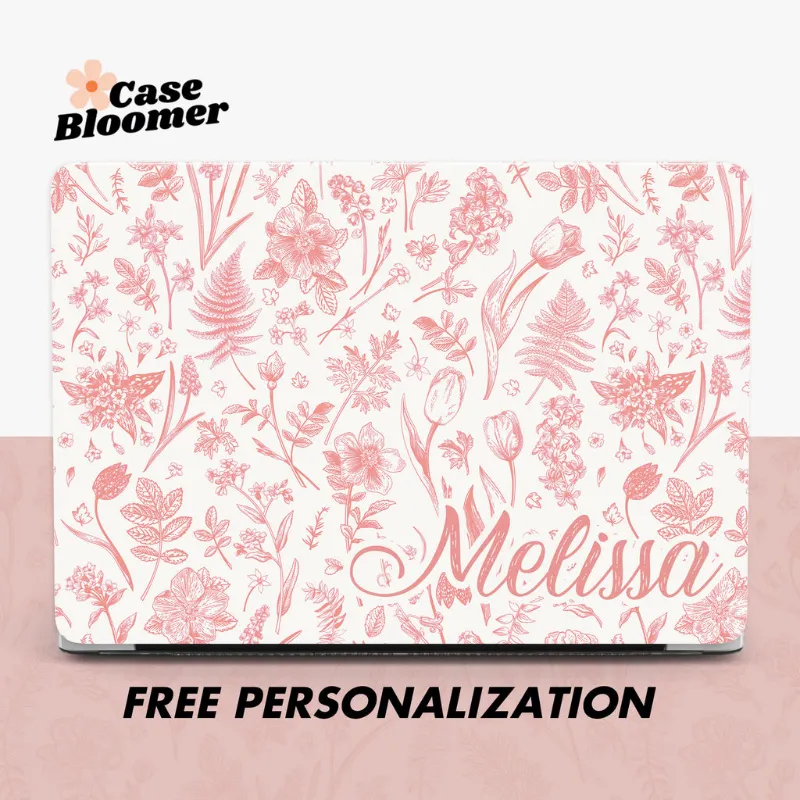
Not every design carries every option. The pink botanical MacBook case, for example, lists the three Air 13 inch options above but no M4 option. If you have an A3240, check that the design you like includes it before you add text or upload a photo.
What the case is made of, and what it does
CaseBloomer describes its MacBook cases this way:
- Plastic material, slim and lightweight.
- Top and bottom protection parts that snap on and off.
- Protection from scratches, from all angles.
- Cut so they do not block necessary ports.
That is the full list of claims. CaseBloomer does not publish anything about heat, cooling or drop ratings for these shells, so we do not make claims about them either. What the snap-on design does give you is choice: you can take the case off in seconds whenever you want the bare laptop, for example during long, heavy work sessions, and snap it back on before you pack the laptop away.
When you fit it, line up the top piece with the lid first, press the corners in until they click, then do the same with the bottom piece. Check that each port is clear before you plug anything in.
Designs, personalisation and ordering
CaseBloomer’s MacBook range includes coquette ribbon designs, cherry and checkerboard prints, a pink botanical print, a vintage cassette print and an old newspaper print, as well as photo and photo collage cases where you supply the image. CaseBloomer says a personalised name or words can be added on each case.
Because every case is made to order, read these points from the product page before you buy:
- Standard crafting time is 6 to 9 business days, before shipping.
- Colors and the position of graphics can differ slightly from the preview.
- Cancellations must be requested within 12 hours of purchase.
- For a problem with an order, contact CaseBloomer within 5 days of delivery and ship items back within 14 days.
- Any purchase with customization cannot be returned or exchanged.
The last point is the one to remember. A personalised case in the wrong model cannot be swapped, so the minute it takes to read the A number off the bottom of your MacBook is the step that protects the whole order.
Questions
How do I know which CaseBloomer MacBook Air 13 inch case fits?
Turn the laptop over, find the model code after the word Model (it starts with A), and choose the Device option with that exact code on the case page.
Does CaseBloomer make a case for the M4 MacBook Air?
The custom photo MacBook case lists an Air 13.6 inch (M4) option for model A3240 and an Air 15 inch (M4) option for A3241. Not every design includes them, so check the Device menu.
Do CaseBloomer MacBook cases cause overheating?
CaseBloomer does not publish heat or cooling information for its cases. It describes them as slim, lightweight plastic shells that snap on and off and do not block necessary ports, so you can remove one easily whenever you choose.
What are CaseBloomer MacBook cases made of?
CaseBloomer lists plastic material, in two pieces (top and bottom) that snap onto the laptop.
Can I return a personalised MacBook case?
No. CaseBloomer's product page states there is no return or exchange for any purchase with customization.
Products in this guide
 Shopping at CaseBloomer? See the discount code
10% OFF All Ordersa
More in this series
How to Choose a CaseBloomer MacBook Pro Case That Fits20 Aug 20263 min Why Your Kindle Oasis Case Won’t Stay Closed (And How to Fix It)20 Aug 20264 min
 Leather vs Fabric vs Silicone: How to Pick an E-Reader Case Material20 Aug 20264 min
 iPad Mini 6 vs iPad Mini 5: Which Case Fits Both Generations?20 Aug 20264 minHow to Clean and Maintain Your Kindle Paperwhite Case Without Damaging It20 Aug 20264 min