 A Tribesigns guide
Tribesigns Gaming Desk vs Computer Desk: Which One Fits Your Setup?
A gaming desk is purpose-built for multi-monitor setups and cable management, while a traditional computer desk prioritizes compact office work.
A gaming desk typically offers wider surfaces, integrated cable management, and reinforced weight capacity for multiple monitors, while a traditional computer desk focuses on compact dimensions and simple writing space. Both serve desktop computing, but your choice depends on how much equipment you run and whether you prioritize gaming features or clean office aesthetics.
Whether you’re building a PS5 console station or a productivity hub, understanding the differences saves you from buying the wrong size or missing the features you actually need.
What Makes a Gaming Desk Different from a Computer Desk
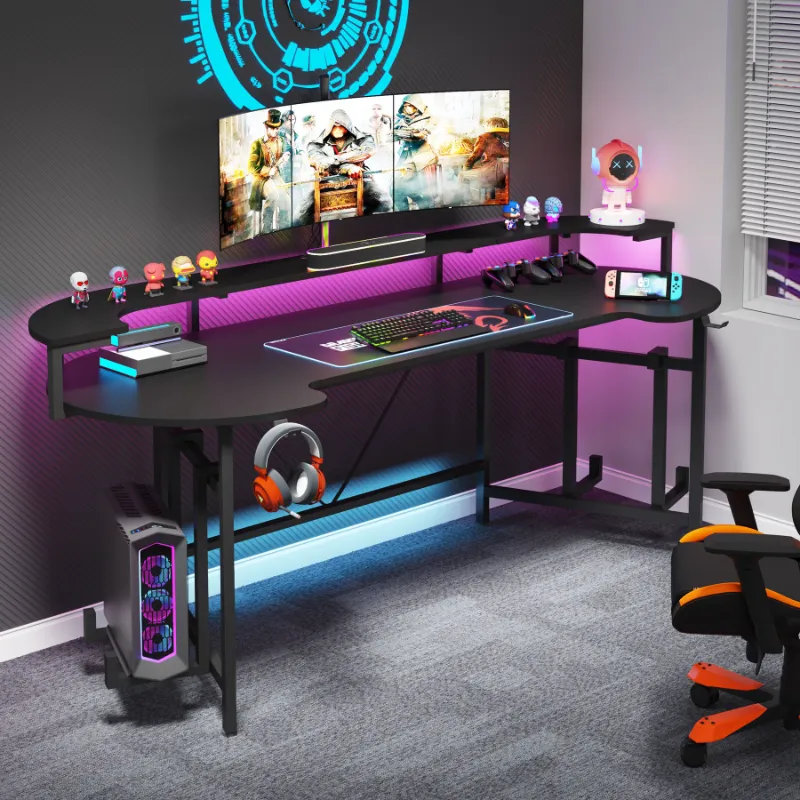
Gaming desks are engineered for heavier loads and wider screens. The Tribesigns gaming desk includes a raised monitor shelf, RGB lighting strips, and cutouts for routing headset and keyboard cables. Desktop surfaces measure 55 to 63 inches wide to accommodate dual or triple monitor arms, while most standard computer desks stop at 47 inches.
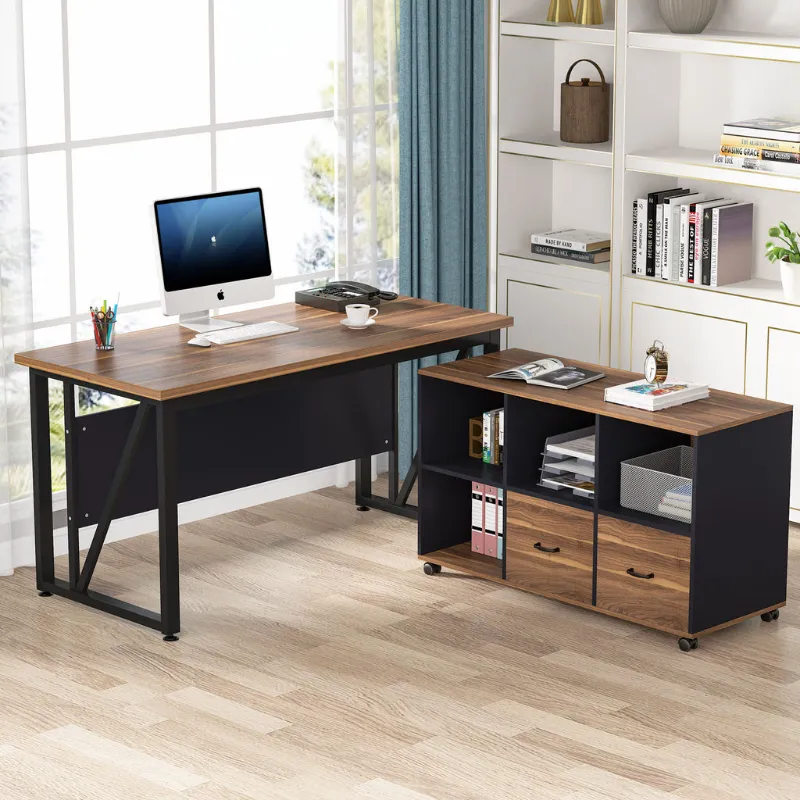
Traditional computer desks like the Tribesigns computer desk prioritize vertical storage. You’ll find built-in drawers, keyboard trays, and hutch shelves that suit document work and video calls. Weight ratings hover around 100 to 150 pounds, enough for a laptop and a single monitor but not the 200-plus-pound capacity gaming setups demand.
Material choices differ too. Gaming models rely on carbon-fiber-textured laminate and steel frames to handle the weight of gaming PCs and mechanical keyboard rests. Office-oriented desks use engineered wood and simpler metal legs, which keep costs lower but limit how much gear you can pile on.
Sizing Your Desk to Your Room and Equipment
Measure your play or work zone before you shop. A 55-inch gaming desk needs at least 60 inches of wall space when you account for cable slack and chair clearance. Depth matters just as much: gaming desks run 24 to 30 inches deep to create distance between your eyes and large monitors, while compact computer desks sit at 20 inches to fit tight home-office corners.
- Gaming desk dimensions: 55 to 63″ W × 24 to 30″ D × 29 to 31″ H (some models include monitor risers that add 4 to 6″ of total height)
- Computer desk dimensions: 39 to 47″ W × 18 to 24″ D × 29 to 30″ H (drawer units may extend depth by 2 to 3″)
- Clearance: leave 36″ behind your chair for rolling and standing
If you’re setting up a console like a PS5, a gaming desk with a lowered keyboard tray doubles as a controller shelf. For dual-purpose setups that mix work video calls and evening gaming, look for models with removable monitor stands so you can switch between laptop-height ergonomics and elevated screen viewing.
Check the latest pricing and grab our 12% code to compare Tribesigns configurations before you commit.
Cable Management and Accessory Features
Gaming desks build cable routing into the frame. The Tribesigns gaming model includes rear grommets, velcro straps under the desktop, and a metal basket that keeps power strips off the floor.
Standard computer desks offer minimal or no cable pass-throughs. You’ll rely on adhesive clips or aftermarket cable sleeves, which work fine for a laptop charger and a desk lamp but become messy when you add a webcam, microphone arm, and RGB peripherals.
Other gaming-specific features worth knowing about:
- Cup holder and headset hook: molded into the desktop edge or clipped onto the frame
- Controller charging station: some models include USB hubs built into the leg
- RGB lighting: remote-controlled LED strips that sync with your game, though you can disable them for work calls

If you don’t need those extras, a traditional computer desk saves you money and offers file-drawer space that gamers rarely use. A separate bookshelf works well for documents, leaving the open leg room under a gaming desk free for a subwoofer or UPS battery.
Materials, Durability, and Weight Capacity
Tribesigns gaming desks use 0.6- to 0.8-inch particleboard with a PVC or melamine gaming-texture top and powder-coated steel T-legs.
Computer desks in the same price range use thinner 0.5-inch boards and simpler four-leg or A-frame designs. They handle everyday typing and video streaming but flex under the weight of a heavy gaming rig. If you plan to mount a monitor arm with a C-clamp, confirm the desktop thickness: many budget computer desks measure under 0.6 inches and won’t grip a clamp securely.
Surface durability also varies. Gaming laminates resist scratches from mouse pads and controller drops better than the smooth veneer finishes on office desks.
For long-term use, inspect leg construction. Gaming desks use triangular or K-shaped crossbars that prevent side-to-side wobble when you bump the desk during gameplay. Office desks rely on simpler horizontal bars that work for seated typing but feel less stable if you shift weight or lean in during competitive play.
Which Desk Type Suits Your Work and Play Style
Choose a gaming desk if you:
- Run two or more monitors or a single ultrawide display
- Play on PC with a full-size keyboard, mouse pad, and wired peripherals
- Store your gaming PC on the desktop rather than under the desk
- Want built-in RGB and accessory mounts
- Need 200+ pound weight capacity for heavy equipment
A gaming desk also makes sense for streamers who mount microphone arms, ring lights, and capture cards. The wider surface and integrated cable trays keep your broadcast background clean without requiring separate furniture.
Pick a traditional computer desk if you:
- Work primarily on a laptop or a single monitor
- Value vertical storage like file drawers and hutch shelves
- Prefer a cleaner, office-style look without RGB or gaming textures
- Have limited floor space and need a compact 40-inch width
- Don’t need cable management beyond a single grommet
We recommend the Tribesigns computer desk for hybrid workers who occasionally game on a laptop or console but spend most of their time in spreadsheets and Zoom calls. You can always add a monitor arm and cable sleeves later, and you’ll save $30 to $50 versus a full gaming configuration.
For detailed specs on each model and to see which Tribesigns desks currently qualify for our coupon, visit the store page. Both desk types ship with clear instructions and assemble in 30 to 45 minutes with a Phillips screwdriver and the included hex wrench.
Desk Shopping Tips and Where to Find the Best Deals
Before you order, read recent buyer reviews on dimensions and packaging. Some gaming desks ship in boxes over 60 inches long, which won’t fit in sedan trunks. Tribesigns offers curbside delivery, but you’ll need a dolly or a second person to move the carton indoors.
Compare return policies if you’re unsure about size. Many retailers allow 30-day returns on unassembled furniture, but restocking fees apply once you open the hardware bag. We suggest measuring your space twice and checking product photos for scale references like keyboards or monitors in the frame.
Popular gaming desk options from IKEA and other brands often appear in roundups like PC Gamer’s top picks and TechRadar’s gaming desk guide, but Tribesigns models deliver similar features at lower price points when you apply our discount code.
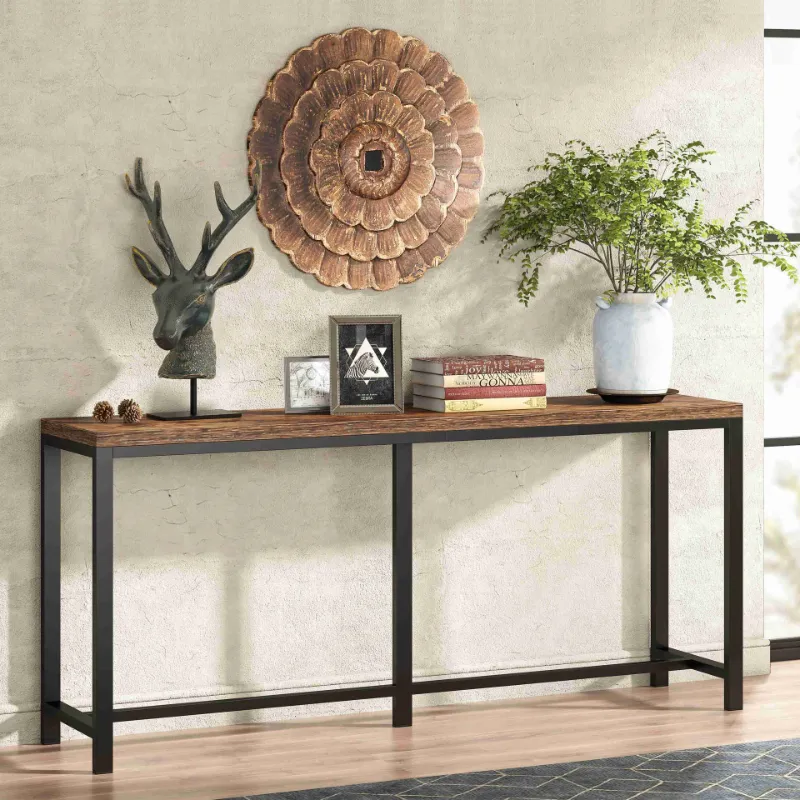
Look for bundle offers that pair desks with matching storage pieces like a console table for extra peripherals or a bookshelf for game cases and collectibles. Stacking your order can trigger free shipping thresholds and maximize the 12% savings from our Tribesigns coupon.
Both gaming and computer desks serve their purpose when matched to your actual workload. Measure your gear, honest-assess how many screens you’ll run, and choose the frame that fits your room without guessing on width or depth.
Questions
Can I use a regular computer desk for gaming?
Yes, but you may face size and weight limits. Standard computer desks typically support one monitor and lighter equipment, while gaming setups with multiple screens, a tower PC, and peripherals often exceed the weight capacity and surface area of office-style desks.
What width gaming desk do I need for two monitors?
A 55-inch or wider desktop comfortably fits two 24- to 27-inch monitors side by side with space for a keyboard and mouse pad. Smaller desks under 50 inches require you to angle the monitors or use a dual-arm mount to save horizontal space.
Do Tribesigns gaming desks include cable management?
Most Tribesigns gaming models include rear grommets, under-desk cable trays, and velcro straps. Traditional computer desk versions may offer only a single grommet or no built-in routing, so check the product specs before ordering.
How much weight can a Tribesigns gaming desk hold?
Tribesigns gaming desks generally support 200 to 250 pounds, enough for a full tower PC, dual monitors, and peripherals. Their computer desks typically rate for 100 to 150 pounds, suitable for a laptop and a single monitor but not heavy multi-screen rigs.
Are gaming desks worth the extra cost over computer desks?
If you run multiple monitors, need heavy-duty cable management, or want accessory mounts like headset hooks and RGB lighting, the added features justify the price. For single-monitor work or casual laptop use, a traditional computer desk saves money without sacrificing function.
Will a gaming desk work for a PS5 console setup?
Yes. Many gaming desks include monitor shelves and keyboard trays that double as controller storage, plus wide surfaces for a TV or gaming monitor. The built-in cable routing keeps HDMI and power cords organized for console play.
Products in this guide
 Shopping at Tribesigns? See the coupon code
12% OFF All Orders
Shopping at Tribesigns? See the coupon code
12% OFF All Orders
More in this series
 Tribesigns Shoe Rack Capacity: How Many Pairs Can It Really Hold?11 Aug 20265 min
 Best Ways to Style a Tribesigns Room Divider in Small Apartments11 Aug 20266 minHow Long Do Tribesigns Bookcases Last with Heavy Use?11 Aug 20265 minWill a Tribesigns Console Table Hold a 75-Inch TV?11 Aug 20264 min
 How to Assemble a Tribesigns Bed Frame Without Frustration11 Aug 20266 min