 A Tesstudio guide
How to Pick a Tesstudio Starlink Mini Power Bank
Tesstudio Starlink Mini power bank, explained: the 99Wh and 129.5Wh options, the 87W and 65W outputs, flying with it and choosing a mount.
To pick a Tesstudio Starlink Mini power bank, decide first whether you will fly with it: the 99Wh versions (27000mAh and 27500mAh) are the ones Tesstudio lists as airline-approved, while the larger 35000mAh (129.5Wh) version is the one it lists for longer off-grid runtime, up to 6 hours of Starlink Mini power. Then choose a mount option for how you set the dish up. Our Tesstudio discount code page lists the current code and how to use it.
The three capacity options
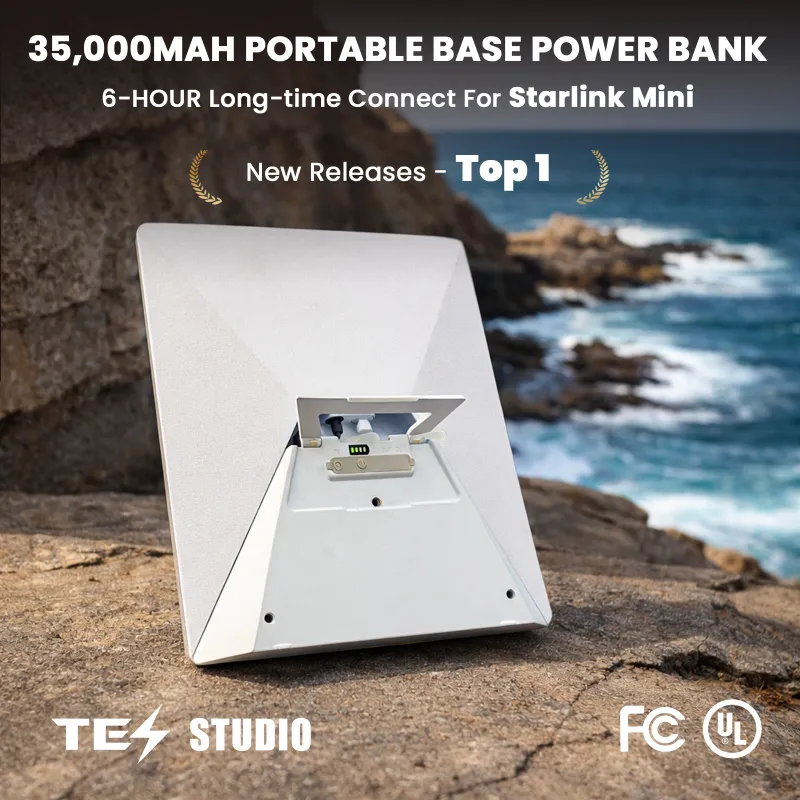
The Tesstudio Starlink Mini power bank is one listing with three battery choices. All figures here are from Tesstudio’s product page:
| Option | Energy | Tesstudio’s note |
|---|---|---|
| 27000mAh | 99Wh | Airline-approved, travel-focused |
| 27500mAh | 99Wh | Airline-approved, travel-focused |
| 35000mAh | 129.5Wh | Extended runtime; listed at up to 6 hours of Starlink Mini power |
Two units are in play here. mAh is the cell capacity printed on the battery. Wh (watt-hours) is the stored energy, and it is the figure that decides how long a device runs and what airlines look at. That is why two different mAh ratings both come out at 99Wh.
In practice the choice follows the trip. If you work remotely and fly between sites, a 99Wh option keeps you inside the size Tesstudio labels for carry-on travel. If you drive to a campsite or keep the setup in an RV, the 129.5Wh version gives you the longer listed runtime, and no airline rule comes into it. The two 99Wh options carry the same energy rating and the same airline-approved label, so either one suits a flying trip.
Tesstudio is careful about runtime. Its page says runtime depends on the capacity you choose, the Starlink Mini’s load, temperature, any other devices you charge and the battery’s condition, and it does not give a figure for the 99Wh versions. So we do not give one either. If a full day of connection matters, plan for more power than a single bank.
What the outputs do
- DC output for Starlink Mini: listed at up to 87W.
- Two USB-C ports: listed at up to 65W, for compatible laptops, phones, tablets and cameras.
- Cells and protection: 21700 lithium-ion cells, with protection listed for overcharge, overheating and short circuit.
- Status indicator: so you can check charge before you head out.
Charging a laptop or phone from the same bank shares its stored energy, so the dish will run for less time. If the internet connection is the priority, keep other devices on a separate battery.
Flying with it
If the power bank goes in your carry-on, choose one of the 99Wh versions. Tesstudio labels them airline-approved but also says airline and local battery rules can change, and asks you to confirm the current policy with your airline before you fly. Do this every trip, especially on international routes or smaller carriers, and keep the bank in your cabin bag.
The 129.5Wh version is sold for runtime, not for travel. Check your airline’s rules before taking it anywhere near an airport.
Choosing a mount option
Each capacity can be bought with or without a mount. Tesstudio’s FAQ explains the choice:
- Without extra mount: if you already have a stand or setup.
- Triangular bracket: for simple outdoor placement.
- Suction cup mount: for glass, such as a vehicle window.
- Magnetic mount: for suitable metal surfaces.
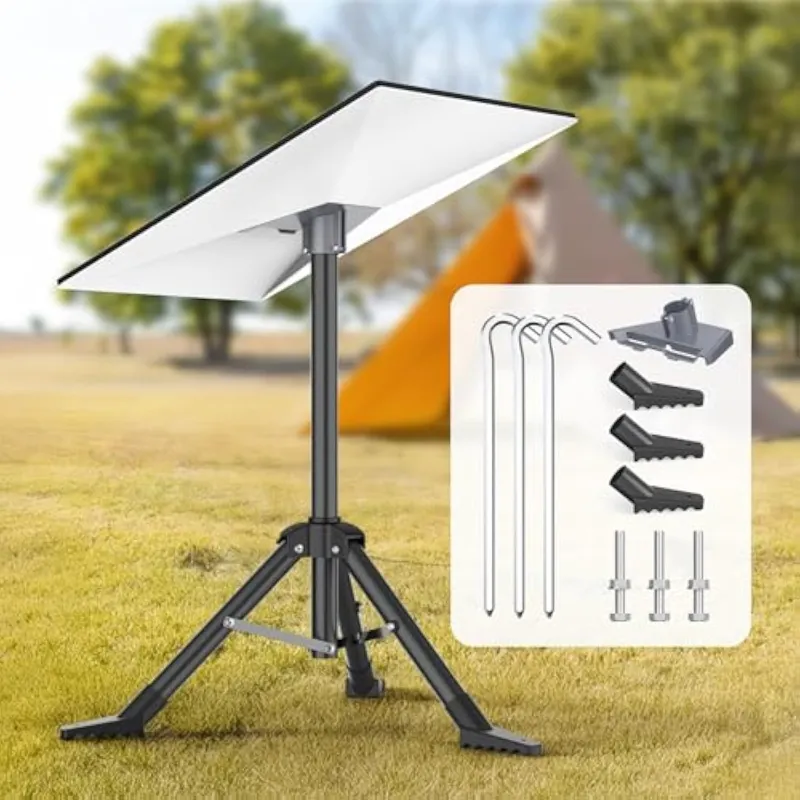
If you want the dish higher off the ground at a campsite, Tesstudio also sells a Starlink tripod stand that fits the Starlink Mini and Gen 3, with a hard-shell case.
Before a trip
- Charge the bank fully the day before and check the status indicator.
- Confirm your capacity and mount option match the trip (flight, car, camp).
- Keep a backup power source for anything critical. Tesstudio’s own FAQ says the bank does not replace normal power planning.
- Keep the bank out of direct sun and extreme cold, since the page lists temperature as one of the factors that changes runtime.
Questions
Which Tesstudio Starlink Mini power bank can I take on a plane?
Tesstudio lists the 99Wh versions (27000mAh and 27500mAh) as airline-approved. It also says airline rules can change, so confirm with your airline before you fly.
How long does the Tesstudio power bank run a Starlink Mini?
Tesstudio lists up to 6 hours for the 35000mAh (129.5Wh) version and gives no runtime for the 99Wh versions. It says runtime depends on load, temperature, other devices and battery condition.
What output does the Tesstudio Starlink Mini power bank have?
The page lists up to 87W DC output for Starlink Mini and two USB-C ports up to 65W for other devices.
Can it charge my laptop too?
Tesstudio says the dual USB-C ports, up to 65W, work with compatible laptops, phones, tablets and cameras. Charging them uses energy that would otherwise run the dish.
Which mount should I choose?
Tesstudio suggests no extra mount if you already have a setup, the triangular bracket for outdoor placement, the suction cup for glass, and the magnetic mount for metal surfaces.
Products in this guide
Shopping at Tesstudio? See the discount code
25% OFF Sitewide
More in this series
 What to Know Before Buying Tesstudio’s Rivian R1T Cross Bars1 Aug 20263 min
 What to Know About Tesstudio Floor Mats for Your Tesla1 Aug 20263 min
 Do Tesla Rim Protectors Actually Prevent Curb Damage?1 Aug 20264 minHow to Install a Starlink Mini Tripod for Optimal Signal1 Aug 20266 min
 Tesla Model 3 vs Model Y Roof Rack: Which Fits Your Needs?1 Aug 20264 min