 A Vtuvia Ebike guide
Ebike Throttle Not Working? How to Troubleshoot It Step by Step
A dead ebike throttle can be a setting, not a broken part. Check the battery, the P10 driving mode, the plug and cable, then the warranty.
If your ebike throttle stopped working, check the simple things in order: the battery, the display’s driving mode setting, the throttle plug, then the throttle itself. On a Vtuvia, one display setting can switch the throttle off entirely, so look there before you buy parts. If those checks do not find it, the throttle is covered under Vtuvia’s electrical parts warranty, and support will help you trace the fault. We keep the current code for Vtuvia Ebike on its store page.
Step 1: Check power and the battery
A throttle can only send a signal if the system has power. Start here:
- Charge the battery. Charge it fully, then try again.
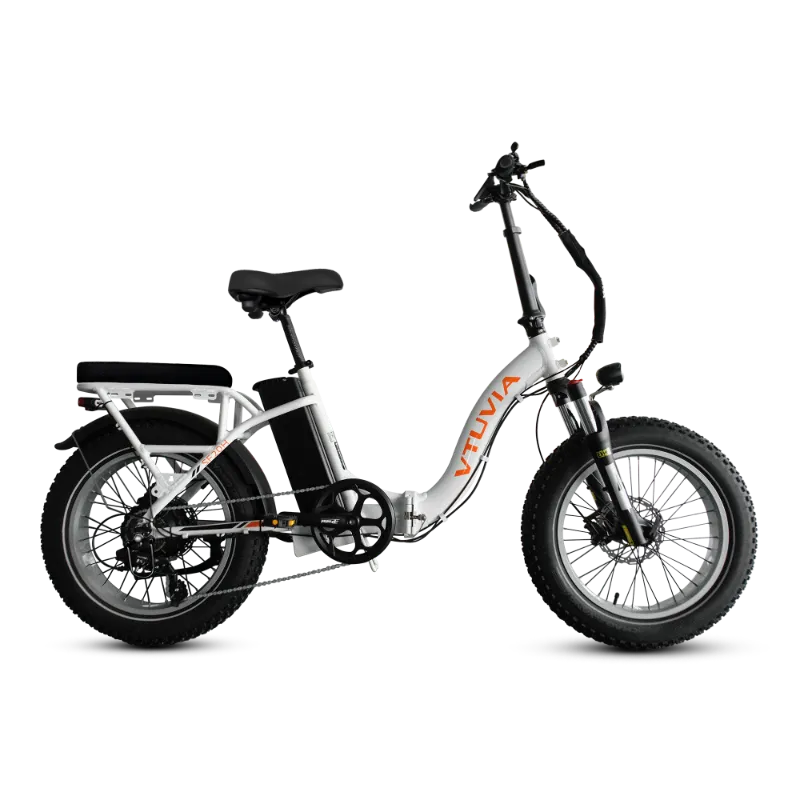
- Re-seat it. Bikes like the Vtuvia SF20H use a removable 48V 14Ah battery. Take it out, check the contacts for dirt or damage, and lock it back in place firmly.
- Turn the system off and on. Power down, wait a moment, and restart the display.
If the display does not light at all, the problem sits with the battery, charger or power wiring rather than the throttle. Contact Vtuvia support at that point instead of replacing the throttle.
Step 2: Check the display’s driving mode
This check can save you the cost of a new part. Vtuvia’s display guide for the SF20 explains that setting P10 controls the driving mode:
| P10 value | What the bike does |
|---|---|
| 00000 | Pedal assist only. The throttle does nothing. |
| 00001 | Throttle only. |
| 00002 | Pedal assist and throttle together (the default) |
To reach the settings, the guide says to press and hold the plus and minus buttons together for a few seconds. Press M to move from one setting to the next, and use plus or minus to change a value.
While you are there, look at P08, the speed limit. A value of 00100 means no limit. A lower value caps the bike at that percentage of its speed, so 00030 gives 30%. If someone set it low, the throttle will feel weak rather than dead. Vtuvia asks owners to leave the other default settings alone, since changing them can affect how the bike rides.
These settings come from Vtuvia’s SF20 guide. Other Vtuvia models may use a different display, so check the manual for yours.
Step 3: Check the throttle plug and cable
With the bike switched off, follow the throttle cable from the handlebar to where it plugs into the wiring harness.
- Unplug and re-plug the connector, pushing it fully home.
- Look for damage: bent pins, a cracked plug housing, or a cable that is pinched or rubbed through near the handlebar or the folding hinge.
- Think about water. Vtuvia’s FAQ says its bikes are water-resistant and handle light rain or splashes, but should not be submerged or left out in heavy downpours for long. If the throttle failed after a soaking, let the bike dry fully before you try it again.
- Check the brake levers. If your bike has motor cut-off sensors in its brake levers, a lever that does not spring fully back can stop motor power. Squeeze and release both levers and try again.
Step 4: Replace the throttle or use the warranty
If power, settings and wiring all check out, the throttle itself may have failed. You have two routes.
Warranty first. Vtuvia’s warranty policy lists the throttle under electrical parts, with 2 years of cover against defects in materials and workmanship. It applies to the original purchaser of a bike bought directly from vtuviaebike.com in the United States, and proof of purchase may be required. Vtuvia also says any owner can contact its support team for troubleshooting during the life of the bike. Email [email protected] with your name and order number.
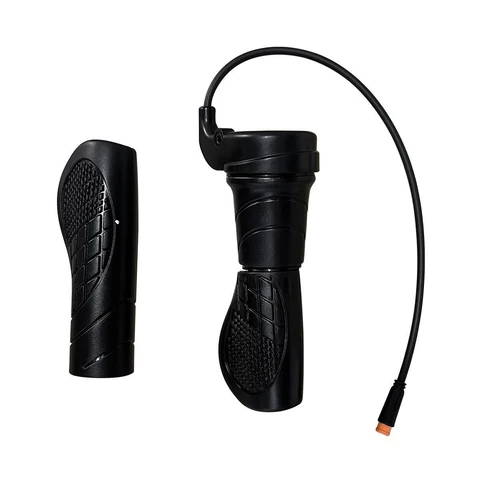
A replacement part. Vtuvia sells the SF20 half-twist throttle, but the listing says it fits only the SF20, the older SF20H and the SK20. It also states that accessories are non-refundable and non-exchangeable, so confirm your model with support before you order. For fitting steps, see our separate guide on installing an ebike throttle on a Vtuvia.
Questions
Why does my Vtuvia throttle not work but pedal assist does?
Check display setting P10. Vtuvia's SF20 guide says 00000 sets the bike to pedal assist only, which turns the throttle off. The default, 00002, runs pedal assist and throttle together.
How do I get into the settings on a Vtuvia SF20 display?
Vtuvia's guide says to press and hold plus and minus together for a few seconds, then press M to move between settings and plus or minus to change a value.
Is the throttle covered by Vtuvia's warranty?
Yes. Vtuvia's warranty policy lists the throttle as an electrical part with 2 years of cover, for the original buyer of a bike bought directly from vtuviaebike.com in the US.
Will the Vtuvia SF20 half-twist throttle fit my bike?
The listing says it fits only the Vtuvia SF20, the older SF20H and the SK20. Accessories are non-refundable and non-exchangeable, so check your model with support before ordering.
Why does my throttle feel weak instead of dead?
Check setting P08, the speed limit. A value of 00100 means no limit, while a lower number caps speed at that percentage.
Products in this guide
Shopping at Vtuvia Ebike? See the discount code
$100 OFF All Orders
More in this series
 How to Lock an Electric Bike Outdoors for Long-Term Storage27 Aug 20263 minHow to Clean and Maintain Your Electric Hunting Bike After Off-Road Use27 Aug 20264 minWhat to Look for in an RV Bike Rack That Can Carry Heavy Ebikes27 Aug 20264 minHow to Install an Ebike Throttle on a Vtuvia or Class 1 Ebike27 Aug 20265 minVtuvia SF20H vs SN100: Which Ebike Suits Your Riding?27 Aug 20263 min