 A Canvia Art guide
How to Choose a Digital Picture Frame for Your Home
A digital picture frame lets you rotate photos or artwork on your wall. Here is how to compare display size, resolution, connectivity and finish.
To choose a digital picture frame, compare display quality, connectivity and how easily it rotates your favorite images or artwork without physical frame swaps. Whether you’re displaying family photos, digital art, or landscape photography, choosing the right frame depends on your space, budget, and how you plan to use it. You can find the current code on our Canvia Art discount code page.
What Makes a Digital Picture Frame Worth Buying
A digital picture frame serves as both a practical display and a design element in your home. The core appeal is flexibility: you can update what’s on your wall instantly via WiFi or mobile app, without replacing the physical frame. Look for models that offer 1080p resolution or higher, responsive touchscreens, and intuitive apps for uploading images.
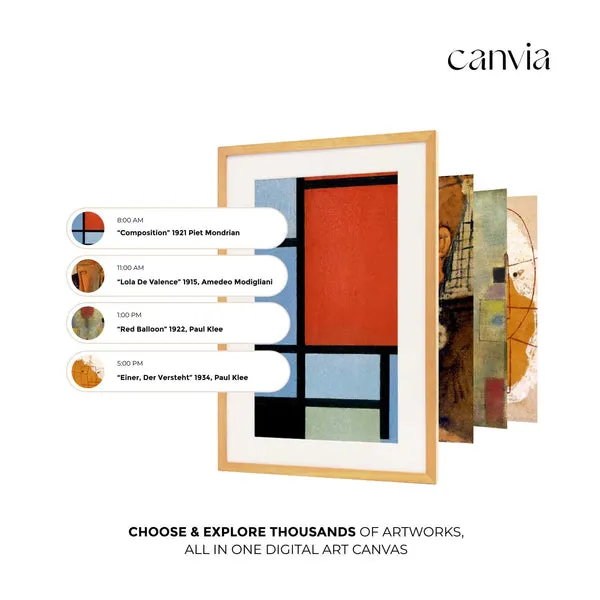
Canvia Art sells a digital art canvas with a full-HD display, according to its site, in black, oak, cherry and white frames. Compare the canvi Digital Art and the canvia Digital Frame listings, along with Frame canvas art, chroma canvas and the cezanne landscape.
Screen Size and Resolution for Your Space
Digital picture frame sizes range from compact 7-inch screens to large 32-inch digital picture frame options. Before buying, measure your wall space and consider viewing distance. A 10-15 inch frame works in bedrooms or hallways. Larger rooms benefit from a 20-32 inch digital picture frame that commands more visual presence.
Resolution matters just as much as size. A 1080p display looks crisp on smaller frames and acceptable on medium ones, but for larger screens, 2K or 4K resolution prevents pixelation. When you compare models such as the Canvia Smart Digital Art Frame, check that the resolution suits the screen size.
Comparing Display Types: IPS vs. Standard LED
| Feature | IPS Display | Standard LED |
|---|---|---|
| Viewing angles | 178° (excellent) | Narrower (check the spec) |
| Color accuracy | Vibrant, true-to-life | Check the spec |
| Glare | Minimal | More reflective |
| Price | Higher | More affordable |
IPS panels deliver superior color accuracy and work from any angle, making them worth checking for if your frame sits in a corner or if multiple people view it from different positions. Standard LED screens are budget-friendly but show color shift when viewed at angles. Check the panel type in each listing, including Canvia’s digital wall frame; Canvia says its canvas is visible in detail from any angle.
Connectivity and Ease of Use
Modern digital frames connect via WiFi to your phone, cloud storage, or social media. You should be able to upload photos, schedule slideshows, and manage collections without touching the frame itself. App responsiveness matters: clunky interfaces defeat the purpose of instant updates.
Check the digital canvas and computerized picture listings for the setup steps, the photo services they sync with, and scheduling options. Avoid models requiring USB transfers or manual SD card updates if convenience is your priority.
Frame Materials and Aesthetic Fit
Your frame’s build quality and finish affect how well it blends into your décor. Canvia lists black, oak, cherry and white frames on its site. Styles to compare:
- Canvas-style finishes: Check the ft canvas and digital canvas crossword listings for the finish.
- Minimalist frames: Slim bezels and sleek borders suit modern interiors.
- Logo-focused designs: Check the canvia logo listing for what it includes.
Choose finishes that match your existing furniture and wall colors. A thin black frame disappears into white walls, while natural wood complements warm, traditional spaces.
Digital Picture Frames for Different Uses
For family photos: Look for frames with multi-user access, so grandparents can upload images via the app. For grandparents, look for a large display and a simple interface. Check whether Canvia’s frame canvas art and canvi Digital Art support multiple accounts and shared albums before you buy.
For digital artists: If you rotate artwork, Canvia says its ArtSense technology adjusts images to the room’s light; check the digital canvas and canvi Digital Art listings for resolution.
For landscape lovers: The cezanne landscape listing is the one to check; Canvia says its library holds over 10,000 paintings and photographs.
For sleek, modern homes: Check the digital wall frame listing for bezel size and frame colors.
Where to Buy and Current Pricing
You can also research Aura Frames if you want to compare features across the digital picture frame market.
Setup and Maintenance Tips
Once you choose a frame, setup takes a few steps:
- Connect to WiFi and download the companion app on your phone.
- Create an account and upload your first photo collection.
- Adjust brightness and auto-off schedules to save energy.
- Clean the screen monthly with a soft, dry cloth to prevent dust buildup.
Check whether your frame updates automatically or needs updates from the app. Keep your WiFi stable and your app updated to avoid lag when pushing new images to the frame.
Questions
What size digital picture frame should I buy?
It depends on your wall space and viewing distance. Compact 7-10 inch frames work in bedrooms or hallways. Larger living rooms benefit from 20-32 inch digital picture frame models that command more visual presence. Measure your space first, then choose a size that balances proportion with your room's layout.
Can I use a digital picture frame to display both photos and artwork?
Yes. Canvia says its digital canvas can show artworks from its library or your own photos. Check the app for collections and scheduling.
Is a digital picture frame easy to set up?
Setup follows a few steps: connect to WiFi, download the app, create an account, and upload photos. Check the setup guide that comes with your frame.
What's the difference between IPS and standard LED displays for digital frames?
IPS panels are rated for wide viewing angles, while other panel types have narrower angles and can show color shift. Check the panel type and price in each listing.
Can I share a digital picture frame with family members?
Check the specific model's app for multi-user accounts, which let family members upload photos. This is especially useful for grandparent uploads or shared photo albums.
How do I get current pricing and discounts on Canvia digital frames?
See our Canvia Art page for the current code, and the store for the latest pricing on specific models.
Products in this guide
 Shopping at Canvia Art? See the discount code
$50 OFF All Orders
More in this series
Canvia K Digital Art Frame: Sizes, Battery and Preloaded Collections31 Aug 20263 minThe Complete Guide to Displaying Digital Canvas Art on Your Walls31 Aug 20264 minDo Digital Frames Need Wi-Fi? How Canvia’s Frames Connect31 Aug 20263 minCanvia Digital Art vs Traditional Canvas: Which Is Right for Your Wall?31 Aug 20263 min