 A Canvia Art guide
Canvia Digital Art vs Traditional Canvas: Which Is Right for Your Wall?
How the Canvia Digital Art Canvas compares with a traditional canvas on size, power, setup and art choice, and which suits your wall.
A Canvia Digital Art Canvas is right for you if you want the art on your wall to change, from old masters to your own photos, and you have a power outlet nearby; a traditional canvas is right if you want one fixed piece with no cord, no app and no screen. The Canvia frame is a 27 x 18 inch screen in a wood frame that adjusts each image to the light in your room, so the real choice is between variety and simplicity. The Canvia details below come from Canvia’s product page and FAQ. Our Canvia Art discount code page lists the current code and how to use it.
Canvia and a traditional canvas side by side
| Canvia Digital Art Canvas | Traditional canvas | |
|---|---|---|
| What it shows | Any artwork or photo you choose, changed on a schedule or by app | One image |
| Size | 27 x 18 x 1.6 in, landscape or portrait | Whatever you buy |
| Power | Wired to an outlet, 10 ft cord, 25W average | None |
| Connection | Wi-Fi, managed by the Canvia app or web account | None |
| Picture | 1920 x 1080 Full HD, anti-glare, 16:9 | Fixed print or paint |
| Art supply | Catalogue of 10,000+ works; 1 year of Premium library included | The one piece |
What the Canvia canvas does that a canvas cannot
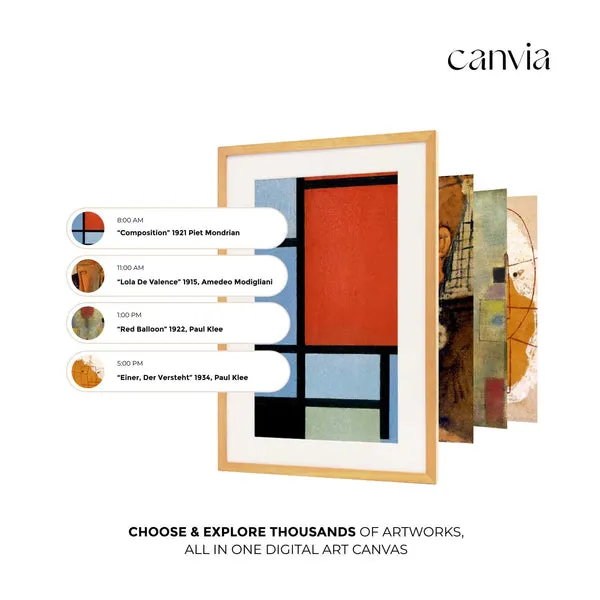
The Canvia Digital Art Canvas is built to look like a painting rather than a screen. Canvia says its ArtSense technology uses built-in sensors to read the room’s ambient light and adjust each image in real time, including at dawn, dusk and under uneven lighting, so the picture keeps a print-like look. It also dims itself as the room darkens, and you can schedule sleep and wake times from your web account.
The content is the other half. Canvia lists a catalogue of 10,000+ pieces, from classic painters to photographers and newer artists, and includes 1 year of access to its Premium library with the frame. You can also upload your own photos and art through the app; Canvia says uploaded images are stored only on the device, which holds up to 10,000 images in 16GB. The app lets you zoom into details, show captions, and manage several Wi-Fi-connected frames with different playlists from one account.
Canvia makes one point clear in its FAQ: it sees itself as different from a basic digital photo frame, because it is designed to show paintings with their texture, colour and brushstrokes rather than oversaturating them.
Where a traditional canvas is simpler
A canvas print hangs on a nail and does nothing else. With Canvia, plan for three things a canvas never asks of you:
- A power outlet within 10 feet. The frame runs on a wired connection. Canvia’s FAQ suggests hanging it in front of an inset outlet, using a paintable flat wire, or a standard cord cover if you want to hide the cable.
- Wi-Fi and an app. Setup and content run through the Canvia app or my.canvia.art, and you register the device to your account.
- Aspect ratio. The screen is 16:9. Artworks in other shapes show with black bars unless you zoom and reposition them, or switch to “Pan and scan” mode, which fills the screen automatically.
For cleaning, Canvia’s FAQ says a soft cloth with a mild cleaning agent of the kind you would use on a laptop or TV is fine.
How to choose

- Choose Canvia if you like changing what is on the wall with seasons or moods, want family photos and fine art in one place, or are filling a room where one fixed piece would get stale.
- Choose a traditional canvas if the wall has no outlet nearby, you want a single piece that never needs an app, or you would rather not have a cord running down the wall.
- Want something small to start? Canvia also sells the Canvia K in 5, 7 and 10 inch sizes, some preloaded with collections such as the Canvia K with Cezanne landscapes (36 paintings). It loads over a USB-C cable from a computer, so it does not need the Canvia app setup.
Buying details
The Canvia frame comes in white, cherry wood or black, with a premium wood frame. Canvia lists free US shipping, with orders estimated to ship within one week; buyers outside the US pay their country’s VAT or sales tax. For hanging, it sells a mounting bracket and a replacement 10 ft power adapter, and has partnered with TaskRabbit for installation, and says installation takes under an hour in the usual case. It also offers refurbished frames and an out-of-warranty monitor repair service.
Questions
What is the difference between Canvia and a traditional canvas?
Canvia is a 27 x 18 inch Full HD screen in a wood frame that shows any artwork or photo you choose and adjusts to your room's light. A traditional canvas shows one fixed image and needs no power or app.
Does the Canvia frame need to be plugged in?
Yes. Canvia says the frame runs on a wired connection to a power outlet, with a 10 ft cord and an average power use of 25W.
Does Canvia come with art?
Canvia lists a catalogue of 10,000+ works and includes 1 year of access to its Premium library with the frame. You can also upload your own images.
Can I hang Canvia vertically?
Yes. Canvia's FAQ says it can hang in landscape or portrait, and you change the orientation in settings.
How do I hide the Canvia power cord?
Canvia's FAQ suggests hanging it in front of an inset outlet, using a flat wire you can paint over, or a standard cord cover.
Products in this guide
Shopping at Canvia Art? See the discount code
$50 OFF All Orders
More in this series
Canvia K Digital Art Frame: Sizes, Battery and Preloaded Collections31 Aug 20263 minThe Complete Guide to Displaying Digital Canvas Art on Your Walls31 Aug 20264 minDo Digital Frames Need Wi-Fi? How Canvia’s Frames Connect31 Aug 20263 minHow to Choose a Digital Picture Frame for Your Home31 Aug 20263 min