 A Nimo PC guide
What Does the Ryzen AI Max+ 395 Offer in a Laptop? The Nimo Axis Explained
The Ryzen AI Max+ 395 puts 16 cores, Radeon 8060S graphics and 128GB of shared memory in Nimo's Axis laptop. Here is what that means and who it suits.
In a laptop, the AMD Ryzen AI Max+ 395 gives you a 16-core processor, Radeon 8060S graphics with 40 compute units and a 50 TOPS AI engine on one chip, all sharing one large pool of fast memory. At Nimo PC that chip goes into the Nimo Axis, a 16-inch laptop that the store sells with 128GB of memory in every configuration. Below we explain what each part of that spec sheet means for you and who the machine suits. We keep the current code for Nimo PC on its store page.
What the Ryzen AI Max+ 395 includes
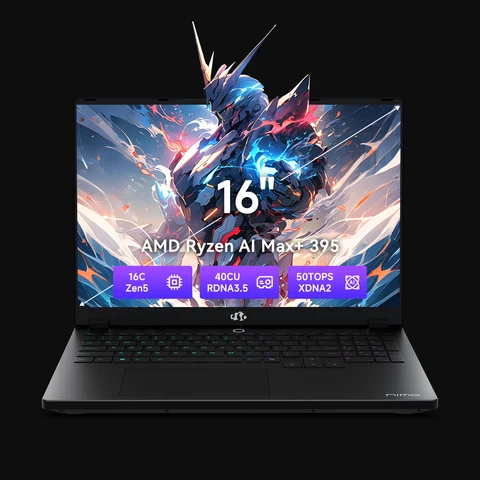
These figures come from Nimo’s listing for the Nimo Axis Ryzen AI Max+ 395 laptop.
- Processor: 16 Zen 5 cores and 32 threads on a 4nm process, boosting up to 5.1 GHz. More cores help when you run several heavy jobs at once, such as compiling code while a video exports.
- Graphics: Radeon 8060S on the RDNA 3.5 design, with 40 compute units at up to 2.9 GHz. Nimo pitches this as enough for gaming and rendering without a separate graphics card.
- AI engine: up to 50 TOPS from the dedicated NPU and up to 126 TOPS across the whole chip, according to Nimo. TOPS (trillions of operations per second) is a rough measure of how much AI work the hardware can process.
- Memory: 128GB of LPDDR5X at 8000 MT/s across 8 channels, shared between the processor and the graphics.
The shared memory is the part that sets this chip apart. The graphics draw on the same 128GB as the rest of the system, so large AI models and big creative projects have a lot of room to load. Nimo says the Axis can run 120B parameter language models locally, and its own FAQ adds that real performance depends on the model.
The rest of the Nimo Axis spec sheet
| Spec | Nimo Axis (per Nimo PC) |
|---|---|
| Display | 16 inch, 2560 x 1600, 165Hz |
| Storage | 1TB, 2TB, 4TB or 8TB, dual M.2 PCIe 4.0 slots |
| Battery | 99Wh |
| Power adapter | 230W, included in the box |
| Cooling | Two large fans; Nimo quotes 154W peak performance sustained |
| Ports | USB4 at 40 Gbps with eGPU support, Oculink, HDMI 2.1, DisplayPort 1.4, USB 3.2, RJ45 for 2.5G Ethernet, microSD reader |
| Wireless | WiFi 7 |
| Weight and size | 2.5 to 3kg; 13.87 x 10.63 x 0.98 inches |
| Sign-in | IR facial recognition |
| Operating system | Windows 11 Pro, or Windows 11 Pro with Ubuntu dual boot |
Two practical notes. The 99Wh battery is the large figure here, but it pairs with a 230W adapter through a dedicated power jack, so plan to carry that brick when you work away from your desk. And at 2.5 to 3kg, this is a machine you move between desks rather than one you hold in one hand.
Memory is fixed, storage is not
Nimo’s FAQ for the Axis is clear: the LPDDR5X memory is built in and cannot be upgraded after purchase. Every configuration on the listing ships with 128GB, so the only choices you make at checkout are storage size and operating system.
Storage is the flexible part. The two M.2 PCIe 4.0 slots let you add or swap SSDs later, so you can start with 1TB and expand when your game library or project files grow.
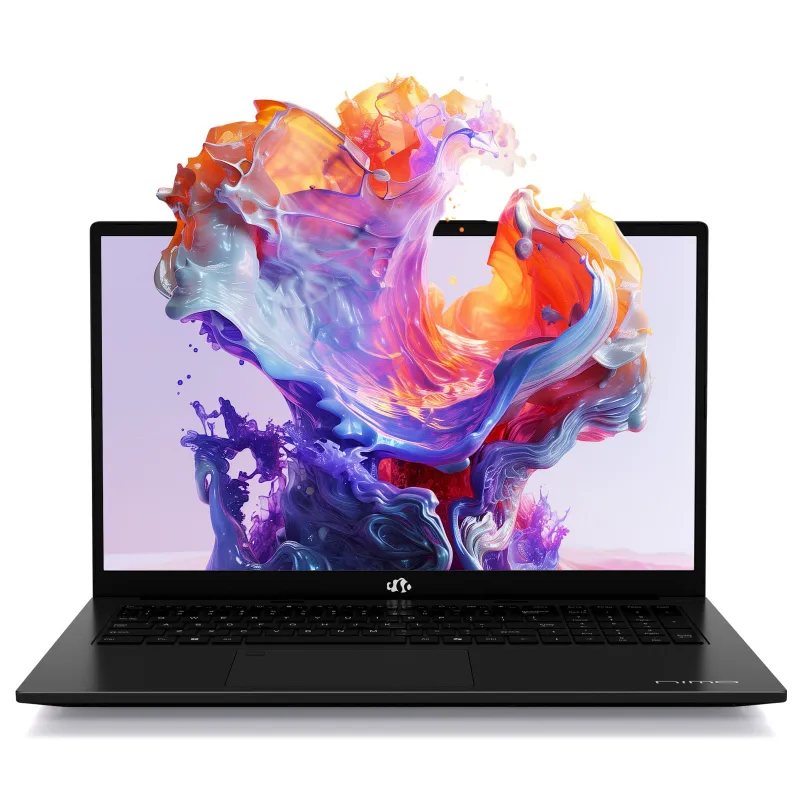
That is a different approach from Nimo’s 17.3 inch Ryzen AI 9 HX 370 laptop, which the store describes as having fully upgradeable memory up to 64GB and even sells as a barebone with no RAM or SSD included.
AI Max+ 395 or Ryzen AI 9 HX 370: which suits you
Both chips are in Nimo’s lineup, and the store’s own specs make the trade-offs clear.
| Nimo Axis (AI Max+ 395) | 17.3 inch laptop (AI 9 HX 370) | |
|---|---|---|
| CPU cores | 16 | 12 |
| Graphics | Radeon 8060S, 40 compute units | Radeon 890M |
| Memory | 128GB, fixed | Up to 64GB, upgradeable |
| Display | 16 inch, 2560 x 1600, 165Hz | 17.3 inch FHD, 144Hz |
| Battery | 99Wh | 75Wh |
| Charging | 230W adapter | 100W USB-C PD |
| Weight | 2.5 to 3kg | 4.6 pounds |
- Choose the Axis if you want to run large AI models on your own machine, work with very large creative files, or want the stronger integrated graphics, and you are happy to pay for 128GB up front.
- Choose the HX 370 laptop if you want a bigger 17.3 inch screen, prefer to add memory yourself, or want a machine that charges over USB-C at 100W.
Nimo lists a two-year warranty, a 90-day return period and free U.S. shipping for the Axis under its current policies.
Questions
What does the Ryzen AI Max+ 395 offer in a laptop?
In the Nimo Axis it brings 16 Zen 5 cores, Radeon 8060S graphics with 40 compute units, a 50 TOPS NPU and 128GB of shared LPDDR5X memory, according to Nimo's listing.
Can I upgrade the memory in the Nimo Axis later?
No. Nimo's FAQ says the LPDDR5X memory is integrated and cannot be upgraded after purchase. Storage can be expanded through the two M.2 PCIe 4.0 slots.
What charger comes with the Nimo Axis?
Nimo lists a 230W power adapter, an AC power cord, a user manual and a thank-you card in the box. The adapter connects through a dedicated power jack.
Does the Nimo Axis support an external GPU?
Nimo lists USB4 at 40 Gbps with eGPU support, and the front ports include Oculink.
Can the Nimo Axis run Linux?
Nimo offers the Axis with Windows 11 Pro, or with Windows 11 Pro and Ubuntu pre-installed as a dual boot.
What warranty does the Nimo Axis have?
Nimo lists a two-year warranty, a 90-day return period and free U.S. shipping under its current published policies.
Products in this guide
Shopping at Nimo PC? See the discount code
$15 OFF Sitewide
More in this series
Can You Game on a Nimo Laptop? Graphics, eGPU and Desktop Options19 Aug 20263 min Does the 65W USB-C Charger Work With All Nimo Laptop Models?19 Aug 20263 min
 Nimo N157 vs Nimo Gaming Laptop: Which Should You Buy?19 Aug 20263 min
 How to Choose the Right Wattage Charger for Your Nimo Laptop19 Aug 20264 min